


Gemini API File Search is now multimodal

Gemini API File Search is now multimodal
Today, we are expanding the Gemini API’s File Search tool. You can now build retrieval-augmented generation (RAG) systems with multimodal data and custom metadata. We’re also introducing page citations to improve grounding and transparency.
Whether you are prototyping a weekend project or scaling a production application for thousands of users, your RAG systems can now natively process and better organize your text and visual data.
Give your apps a photographic memory
File Search now processes images and text together. Powered by the Gemini Embedding 2 model, the tool understands native image data, providing your agents contextual awareness.
Think of a creative agency trying to dig up a specific visual asset. Instead of relying on keywords or filenames, your app can search an entire archive for an image matching a specific emotional tone or visual style described in a natural language brief.
Filter the noise with custom metadata
Dumping files into a database is easy. Finding the right one at scale is the real challenge. Custom metadata allows you to attach key-value labels to your unstructured data — things like department: Legal or status: Final.
By applying metadata filters at query time, your application can scope requests to the data slice required. This significantly reduces noise from irrelevant documents, increasing both the speed and accuracy of your RAG workflows.
Show your work with page citations
When your application pulls an answer from a massive PDF, users need to verify exactly where that answer came from.
File Search now ties the model’s response directly to the original source. It captures the page number for every piece of indexed information. This level of granularity allows you to point users directly to the right spot, which helps build trust and makes your tool immediately useful for rigorous fact-checking.
Get started with File Search
We want to make it as easy as possible to store and retrieve the data that makes your ideas work. The File Search tool handles the heavy infrastructure so you can focus on building the product.
As of early May 2026, the Gemini API File Search has received a major update, transforming it from a text-only retrieval tool into a native multimodal RAG (Retrieval-Augmented Generation) engine.
This update is designed to handle the “messy” reality of enterprise data—where critical information is often trapped in charts, diagrams, and photos—without the need for complex OCR (Optical Character Recognition) pipelines.
1. The Core Update: Native Multimodal Support
Powered by the newly released Gemini Embedding 2 model, File Search now maps text, images, and documents into a single, shared vector space.
-
No More OCR Workarounds: You no longer need to convert images to text before indexing. The model understands the “visual” meaning of a diagram or a screenshot directly.
-
Interleaved Data: If you upload a PDF containing both complex text and financial charts, Gemini indexes both natively. A query about “year-over-year growth” can now “see” the data in the chart just as easily as the text in the caption.
2. Building “Verifiable” RAG
One of the biggest hurdles in AI adoption is trust. This update introduces features to make AI answers auditable:
-
Page-Level Citations: Every response generated via File Search now includes grounding metadata. It links the answer to specific documents and, crucially, exact page numbers.
-
Provenance Auditing: In fields like legal, healthcare, or tax (areas you’ve previously monitored), this allows users to fact-check the AI by clicking directly into the source material.
3. Efficiency via Custom Metadata Filtering
To prevent “hallucination by noise,” you can now apply Custom Metadata Filters at query time.
-
Scoped Retrieval: You can tag documents with labels like
department: "finance",status: "confidential", oryear: "2026". -
Faster, Cheaper Performance: By narrowing the search scope before the model even starts looking, you reduce latency and token waste, making the system significantly more cost-effective.
Implementation Snapshot (Python SDK)
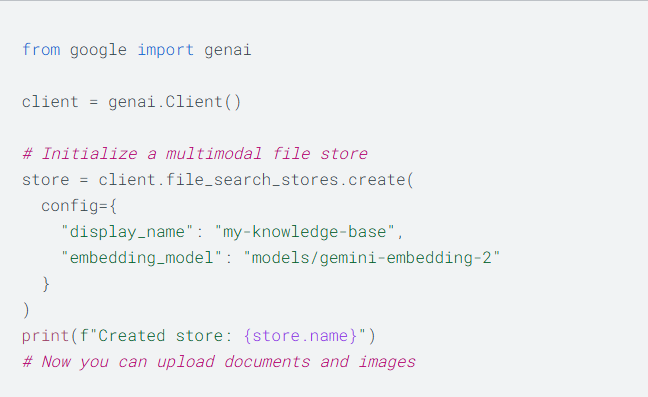
To use these features, ensure you have the latest google-genai package and specify the correct embedding model:
# Create a multimodal store
file_search_store = client.file_search_stores.create(
    config={
        'display_name': 'Strategy_Archives_2026',
        'embedding_model': 'models/gemini-embedding-2' # Required for multimodal
    }
)

# Search with metadata filtering
response = client.models.generate_content(
    model='gemini-2.5-flash', # Or your preferred model
    contents='Summarize the Q1 revenue charts.',
    config={
        'tools': [{
            'file_search': {
                'queries': ['Q1 revenue charts'],
                'metadata_filters': {'department': 'finance'}
            }
        }]
    }
)
Why This Matters for You
Given your interest in Indian administrative frameworks and tax compliance, this update is particularly potent. For example, if you were managing a library of complex Income Tax Act amendments alongside scanned handwritten notices or circulars with tables, this system could retrieve the specific clause and the visual table in one step, citing the exact page of the official gazette for verification.
Read more
106. 7 Powerful Things Google Gemini Can Do
107. Artificial Intelligence Free Courses
108. Google Wallet is now rolling out support for Aadhaar
109. Feeling stuck? Just Ask Google
110. Home Court Advantages | Google + NBA
111. Best Phones Forever: For Good
112. Google Vids: Generate custom music with Lyria 3
113. Making of the Nation – America at 250
114. 7 highlights from Google Cloud Next ‘26
115. Gemini: Your always-on AI assistant in Docs
for more refer Artificial Intelligence website click here