


Approximate location sharing Chrome for Android now with share your approximate location
Approximate location sharing Chrome for Android now with share your approximate location
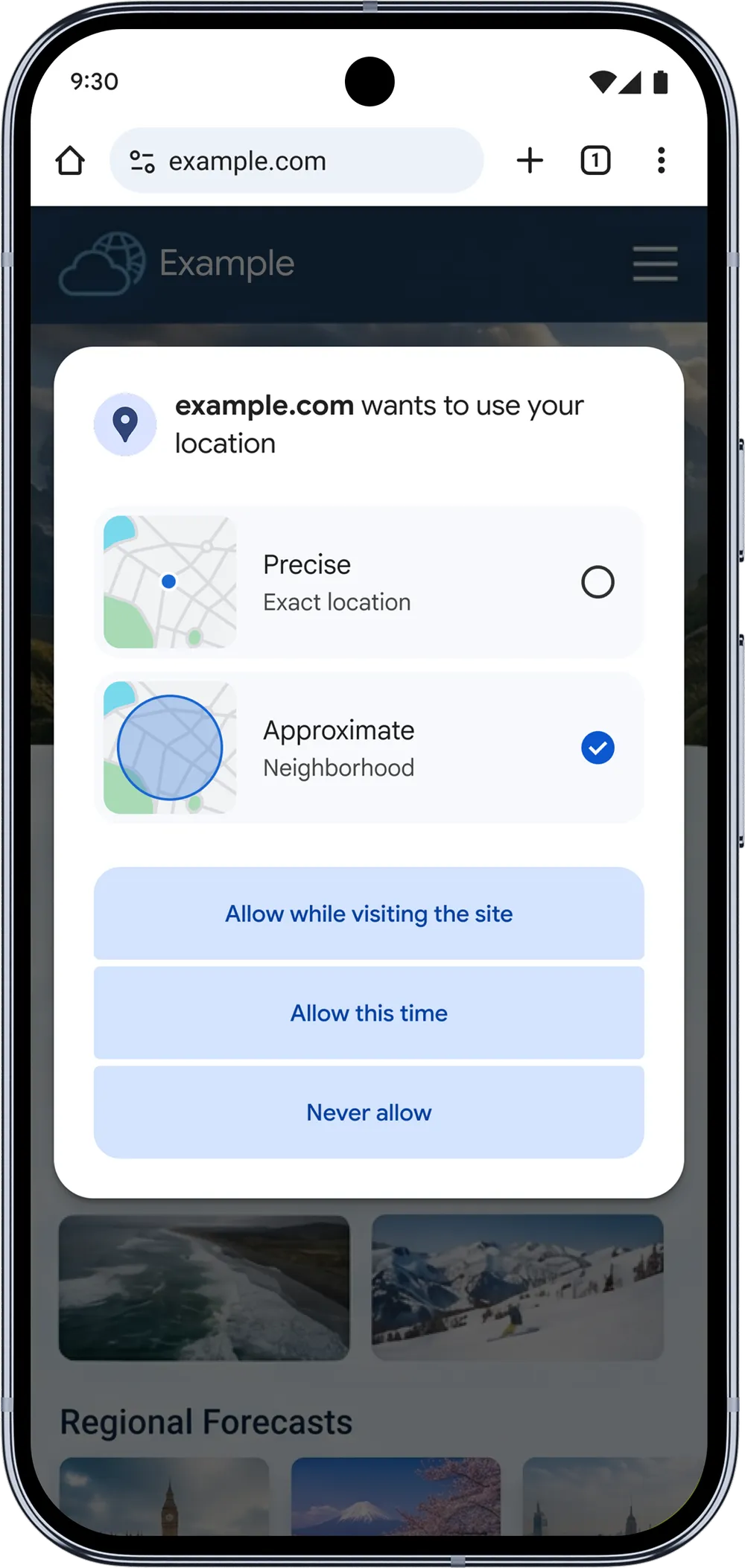
On Chrome on Android, you can now choose to share your approximate location with websites, instead of sharing precise location.
We know that location-based web functionality is useful and some use cases require precise location — if, for example, you’re placing a delivery order or trying to find the closest ATM to your office. However, other use cases may only need your approximate location — like getting access to local weather and news.
By letting you share your approximate location, we’re giving you more control over your location data. And you can still share your precise location when it’s needed — e.g., for navigation — so you won’t lose functionality. We’ll be expanding this feature to desktop in the coming months.
We’re also planning to release new APIs for web developers that will let them request approximate location or specify if they need precise location. We encourage developers to review their location needs and only ask for precise location when it’s required for the site functionality.

As of early May 2026, Google has officially rolled out a significant privacy update for Chrome on Android that allows you to choose between sharing your Precise or Approximate location with websites.
This feature brings the granular location controls already found in the Android operating system directly into the browser.
How it Works
When a website requests access to your location, the standard Chrome permission prompt now includes two selectable options:
-
Precise (Exact): Shares your high-accuracy GPS-level coordinates. This is best for services that require exact positioning, such as real-time navigation, food delivery tracking, or finding the nearest ATM.
-
Approximate (Neighborhood): Shares a broader, neighborhood-scale estimate of your location. This is ideal for websites where a general regional context is sufficient, such as local weather updates, news sites, or checking store hours.
Why the Change?
Previously, Chrome for Android operated on an “all-or-nothing” basis—a website either had your exact location or nothing at all. This update addresses the privacy overkill where sites like recipe blogs or weather portals would unnecessarily track your exact position down to the street level.
Key Details of the May 2026 Rollout:
-
Platform Support: The feature is currently live on Chrome for Android. Google has confirmed it will be coming to Chrome on desktop and iOS in the coming months.
-
Developer Controls: Google is introducing new APIs that allow web developers to specifically request “approximate” data by default. Developers are being encouraged to avoid requesting precise coordinates unless they are essential for the site’s core function.
-
Privacy Parity: This update aligns the web browsing experience with the privacy standards introduced in recent Android versions (like Android 17), giving you more control over your data footprint while you browse.
To adjust these settings for a specific site:
-
Open Chrome and go to the website.
-
Tap the Lock/Site Settings icon to the left of the address bar.
-
Tap Permissions > Location.
-
Toggle between Precise and Approximate as needed.
Read more
110. Home Court Advantages | Google + NBA
111. Best Phones Forever: For Good
112. Google Vids: Generate custom music with Lyria 3
113. Making of the Nation – America at 250
114. 7 highlights from Google Cloud Next ‘26
115. Gemini: Your always-on AI assistant in Docs
116. Gemini API File Search is now multimodal
117. 5 new ways to explore the web with generative AI in Search
118. 5 gardening tips you can try right in Search
119. Flow Music and Believe bring next-gen tools to artists
120. How to Use Google Flow Music (Free AI Music Tool)
for more refer Artificial Intelligence website click here