
Skip to content
Tax Heal
Follow us on Twitter Follow us on Facebook Follow us on Instagram Follow us on LinkedIn Follow us on rss
  • Home
    • GST Online Course
  • GST Update
    • GST Returns Due Dates
    • Eway Bill
    • GST Act
      • CGST Act 2017
      • UTGST Act 2017
      • IGST Act 2017
      • CGST Ordinance
      • CGST ( Extention to Jammu and Kashmir ) Act 2017
      • IGST Ordinance
      • CGST Bill 2017- As Passed by Lok Sabha
      • UTGST Bill 2017 As Passed by Lok Sabha
      • UTGST Bill 2017 As Introduced Lok Sabha
      • Compensation to States 2017 Act
      • CGST Bill 2017 As Introduced in Lok Sabha
      • IGST Bill 2017 As Passed by Lok Sabha
      • IGST Bill 2017 As Introduced in Lok Sabha
      • Revised Model GST Law (Nov 2016)
      • Model GST Law ( June 2016 )
      • Model IGST Law (Nov 2016)
      • GST Compensation Bill 2017 As Passed by Lok Sabha
      • GST Compensation Bill 2017 As Introduced in Lok Sabha
    • SGST Act
      • SGST Acts
    • GST Rules and Forms
      • CGST Rules 2017
      • IGST Rules 2017
      • GST Forms
      • Draft GST Rules
        • Accounts and Records -April 2017
        • Appeals and Revisions – April 2017
        • Advance Ruling – April 2017
        • E Way Bill Rules April 2017
        • Assessment and Audit Rules – April 2017
        • Composition Rules – March 2017
        • Valuation Rules March 2017
        • Transitional Provisions Rules March 2017
        • Input Tax Credit Rules March 2017
        • Refund Rules March 2017
        • Payment of Tax Rules March 2017
        • Registration Rules March 2017
        • Return Rules March 2017
        • Revised Tax Invoice Rules March 2017
        • ITC Mismatch report-Sept 2016
        • Refund Forms-Sept 2016
        • Payment Rules -Sept 2016
        • Payment formats-Sept 2016
        • Invoice Rules-Sept 2016
        • Invoice formats-Sept 2016
        • Registration Rules-Sept 2016
        • Registration formats- Sept 2016
        • Return Rules-Sept 2016
        • Return Formats-Sept 2016
        • Tax Audit Report: GSTR-9B-Sept 2016
    • Notifications
      • Updated Notifications
      • Central Tax
      • Central Tax Rate
      • Integrated Tax
      • Integrated Tax Rate
      • Union Territory Tax
      • Union Territory Tax Rate
      • Compensation Cess
      • Compensation Cess Rate
    • Circulars
      • Central Tax Circulars / Orders
      • Integrated Tax Circular
    • GST Council
    • GST Judgments
    • GST Rates
      • GST Rates Goods
      • GST Rate – Services with Exemption List
      • GST Cess Rates
      • IGST Exemptions/Concessions List
    • Commentary on GST
    • GST Press Release
    • FAQ’s on GST
      • FAQ on GST by CBEC March 2017
      • FAQ on GST by CBEC- Sep 16
      • FAQs on GST-Aug 16
    • Video Tutorial-GST
    • GST History and Background Material
      • Background Material
        • GST Concept
        • GST Presentation-CBEC
        • CBEC
        • ICAI
  • Artificial Intelligence
  • Income Tax
    • Income Tax
      • Income Tax Commentary
      • Income Tax Press Release
      • Important Sections
      • Income Tax Forms
      • Important Rules
      • Income Tax Notification
      • Income Tax Circular
      • Income Tax Instructions
      • Income Tax Office Memorandum
      • Income Tax Judgments
      • Income Tax Video
    • Benami Property
    • PMGKY 2016
    • ICDS
      • ICDS-I
      • ICDS-II
      • ICDS-III
      • ICDS-IV
      • ICDS-V
      • ICDS-VI
      • ICDS-VII
      • ICDS-VIII
      • ICDS-IX
      • ICDS- X
    • Union Budget
      • Budget FY 2017-18
    • Direct Tax Dispute Resolution Scheme
  • Books
    • New Releases in Book Store
    • GST
    • CA Exam
      • CA Final
      • CA -IPCC
    • CS Exam
      • CS Executive Exam Books
    • CMA Exam
    • Income Tax
    • Companies Act
    • Service Tax
    • FEMA
    • Law
    • Business
    • Accounting Standards
    • Auditing
    • Insurance
    • Real Estate
    • IT
    • Negotiable Instruments
    • Financial Management
  • Finance
    • FEMA
    • Company
      • Companies Act 2013
      • Accounting Standard
    • Service Tax
      • Excise and custom
        • Excise
        • Central Excise (N.T) Notifications
        • Cenvat Credit
        • Custom
    • other Acts
      • Real Estate Act 2016
        • Real Estate Books
      • Negotiable Instruments Act
      • Gujarat Vat Act
      • Chhattisgarh VAT
      • Haryana Vat Act
      • KERALA VALUE ADDED TAX
      • Uttarakhand Value Added Tax Act
      • Information Technology Act
      • Competition Act 2002
      • CST
    • Audit
    • RBI
    • SEBI
    • IFRS
    • IRDA
    • Notifications
    • Supreme Court Judgment
    • Empanelment
    • International Taxation
    • Books
      • Australia
      • China
      • Vietnam
    • Judgements
    • Accounting Standards
      • Ind AS- An Overview -ICAI Edition 2016
      • Books
    • Submit Articles
    • Guidance Note
    • Free Downloads
    • Labour Laws
    • Insolvency and Bankruptcy Code 2016
    • TaxHeal Mobile App
  • Bank
  • USA IRS
  • News
    • Knowledge

Post office withdrawal form sb-7 pdf download & Filling Guide

By CA Satbir Singh | May 23, 2026
0 Comment

Post office withdrawal form sb-7 pdf download

Post office withdrawal form sb-7 pdf download & Filling Guide for easy understanding with FAQS

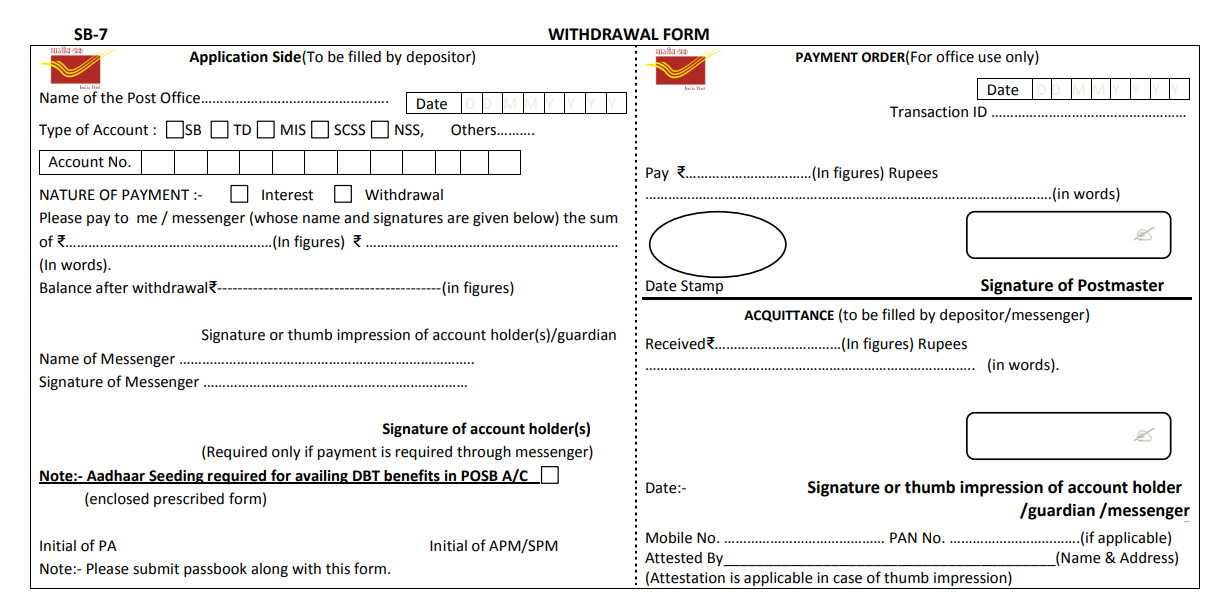
Format of Post office withdrawal form sb-7
What is Form SB-7 (Post Office Withdrawal Form)?

Based on the India Post , here are the key features and details of the Form SB-7 (Withdrawal Form):

1. Purpose & Account Types Covered

This is a unified form used for making withdrawals or claiming interest from various Post Office Savings Bank (POSB) schemes. It caters to:

  • SB: Savings Bank Account

  • TD: Time Deposit

  • MIS: Monthly Income Scheme

  • SCSS: Senior Citizens Savings Scheme

  • NSS: National Savings Scheme (and others)

2. Dual-Section Layout

The form is divided into two distinct vertical sections:

  • Left Side (Application Side): To be entirely filled out by the depositor before submission.

  • Right Side (Payment Order): Strictly reserved for official office use, transaction recording, and the Postmaster’s signature.

3. Key Data Fields Required

  • Account Details: Name of the Post Office, Type of Account, and Account Number.

  • Nature of Payment: Tick boxes to specify whether the transaction is for Interest or a Withdrawal.

  • Amount: Must be explicitly written in both figures and words, along with the expected balance after withdrawal.

  • Identity Details: Fields for the depositor’s Mobile Number and PAN Card Number (if applicable).

4. Third-Party / Messenger Adjustments

  • The form permits a designated Messenger to withdraw money on behalf of the account holder.

  • If used, the specific name and signature of the messenger are mandatory, alongside an additional authorization signature from the account holder.

5. Mandatory Submissions & Compliance

  • Passbook: The physical passbook must accompany this form for verification.

  • DBT Benefit Notice: The form contains a specific note highlighting that Aadhaar Seeding is mandatory if you wish to avail Direct Benefit Transfer (DBT) benefits through your Post Office Savings Bank account.

Download Post office withdrawal form sb-7 pdf

Post office withdrawal form sb-7 pdf download CLICK HERE

Step-by-Step Guide: How to Fill Post Office Withdrawal Form SB-7

what are the steps for Post office withdrawal form fill up ? 

Here is a step-by-step guide to filling out the India Post SB-7 Withdrawal Form, based on the official layout.

The form is split into two vertical halves. You only need to fill out the Left Side (Application Side) and the Acquittance section at the bottom right. Leave the Payment Order section on the top right blank for the postmaster.


Step 1: Top Section (Account & Post Office Details)

  • Name of the Post Office: Write the name of the specific branch where you are transacting.

  • Date: Enter the current date in the DD/MM/YYYY boxes.

  • Type of Account: Check the box that applies to your account (e.g., SB for Savings Bank, MIS for Monthly Income Scheme, SCSS for Senior Citizens).

  • Account No.: Write your complete Post Office account number clearly.

Step 2: Transaction Details

  • Nature of Payment: Check Withdrawal (or Interest if you are only drawing the accumulated interest).

  • Amount Fields:

    • In the first blank space after “the sum of ₹”, write the amount you want to withdraw in figures (e.g., 5,000/-).

    • In the next space, write the exact same amount in words (e.g., Five Thousand Rupees Only).

  • Balance after withdrawal: Calculate and write the remaining balance left in your account after this transaction in figures.

Step 3: Signatures & Personal Details (Bottom Left)

  • Signature or thumb impression: Sign exactly as you did when opening the account.

  • Mobile No. & PAN No.: Enter your registered mobile number and your PAN card number in the designated fields.


Step 4: Acquittance Section (Bottom Right)

This section confirms you have received the cash. Fill this out at the counter:

  • Received ₹: Write the withdrawal amount in figures again.

  • Rupees (in words): Write the amount in words.

  • Signature: Sign again to acknowledge receipt of the money.


💡 Crucial Reminders

  • Passbook: You must present your physical Post Office passbook along with this form, or the transaction will be rejected.

  • Using a Messenger? If you cannot visit the branch yourself, write the Name of Messenger and have them sign the form. You must also sign the extra Signature of account holder(s) line on the left side to formally authorize them.

  • Aadhaar Seeding: If you are using this account to receive government subsidies (DBT benefits), ensure your Aadhaar is linked (there is a checkbox on the form to request this if it isn’t done yet).


General & Usage FAQs

Here are the most frequently asked questions (FAQs) regarding the India Post Form SB-7 (Withdrawal Form), designed to address the most common queries savers and financial practitioners have:

Q1: What is Form SB-7 used for?

A: Form SB-7 is a unified transaction form used to withdraw cash or claim accumulated interest from various Post Office Savings Bank (POSB) schemes, including Savings Accounts (SB), Time Deposits (TD), Monthly Income Schemes (MIS), and Senior Citizens Savings Schemes (SCSS).

Q2: Is it mandatory to submit the physical passbook with Form SB-7?

A: Yes. The physical passbook must accompany the form for verification and updating. The post office will reject the transaction if the passbook is not presented.

Q3: Can I use Form SB-7 to close my post office account?

A: No. Form SB-7 is strictly for partial/regular cash withdrawals or interest claims. For complete account closure or premature closure, you must use Form SB-7B or Form SB-4 (depending on the specific scheme rules).


Third-Party & Messenger FAQs

Q4: Can someone else withdraw money from my account using Form SB-7?

A: Yes. The form features a specific Messenger provision. You must fill out the left side, write the name of your messenger, and sign the authorization block. The messenger must also sign the form in front of the postmaster upon receiving the cash.

Q5: Do I need to sign the form twice if a messenger is withdrawing the money?

A: Yes. You must sign the standard “Signature or thumb impression of account holder” line, and you must also sign the secondary line that states “Signature of account holder(s) (Required only if payment is required through messenger)”.


Technical & Compliance FAQs

Q6: Are PAN and Mobile Number mandatory on Form SB-7?

A: Yes, there are dedicated fields at the bottom left for your registered Mobile Number and PAN Card number. Providing these ensures compliance with anti-money laundering regulations and helps track taxable interest components (like in SCSS or MIS).

Q7: What is the checkbox for “Aadhaar Seeding” on the form?

A: The form contains a crucial compliance note: if you wish to receive Direct Benefit Transfer (DBT) or government subsidies into your Post Office Savings Bank account, you must tick this box and enclose the prescribed Aadhaar seeding form.

Q8: Which sections of Form SB-7 should the depositor leave blank?

A: You must completely leave the top-right section (“PAYMENT ORDER”) blank. This area is strictly reserved for official use, where the postal assistant inputs the transaction ID and the Postmaster signs off on the release of funds.

Related Post

Post Office Account opening form Download

Acknowledgement Slip form Download

AEA Survival Benefit Form Download

Post Office Application for automatic transfer from SB to RD Download

Post Office Application for Availing Cheque facility form Download

Post Office Application for change of nomination from Download

Post Office Application for Fresh Cheque Book from Download

Post Office Application for issue of Duplicate Passbook From Download

Post Office Application for Linking/seeding Aadhaar Number and receiving DBT Benefits into POSB account-NCPI/ mapping from Download

Post Office Application for pledging of form Downloadfv

Post Office Application for settlement of deceased claim case from Download

Post Office Application for the issue of Duplicate Savings Certificates from Download

Post Office Application for transfer of account from Download

Post Office Application for transfer of Savings Certificate from person to person under specified conditions

Post Office Application for transfer of Savings Certificates from Download

Post Office Application Form For Closure Of Account On Maturity from Download

Post Office Application Form For extension of RD/TD/PPF/SCSS Account From Download

Post Office Application Form For Loan/Withdrawl From RD/PPF and SSA Accounts form Download

Post Office Application Form For Opening of Account From Download

Post Office Application Form For Pre-Mature Closure Of Account from Download


YOUR QUERY SOLVED

SB 7,

SB 7 WITHDRAWAL FORM,

POST OFFICE SB 7 WITHDRAWAL FORM DOWNLOAD

Post Office withdrawal form SB-7 PDF Download,
Post office form sb 7 pdf,
Post office form sb 7 download pdf,
Post office form sb 7 download,
Post Office Withdrawal Form pdf,
Post office form sb 7 online,
Post Office Form PDF Download,
Post office withdrawal form fill up,

#IndiaPost, #PostOfficeSavingsBank, #POSB, #FormSB7, #WithdrawalForm, #SavingsAccount, #TimeDeposit, #MonthlyIncomeScheme, #SeniorCitizensSavingsScheme, #NationalSavingsScheme, #CashWithdrawal, #InterestClaim, #PassbookRequired, #AadhaarSeeding, #DirectBenefitTransfer, #MessengerWithdrawal

Category: News Tags: CashWithdrawal FORM POST OFFICE, FormSB7, ostOfficeSavingsBank, post office cash withdrawal form, Post Office Form PDF Download, Post office form sb 7 download, Post office form sb 7 download pdf, Post office form sb 7 online, Post office form sb 7 pdf, post office savings account withdrawal form, post office savings withdrawal form, post office sb 7 form, post office sb 7 form pdf, POST OFFICE SB 7 WITHDRAWAL FORM DOWNLOAD, post office sb withdrawal form, post office withdrawal, post office withdrawal form, post office withdrawal form download, Post office withdrawal form fill up, Post Office Withdrawal Form pdf, post office withdrawal form pdf download, post office withdrawal form sb-7 pdf, Post Office withdrawal form SB-7 PDF Download, post office withdrawal from, post office withdrawal slip, post office withdrawal slip pdf, Post Office Cash Withdrawal Slip, SB 7, SB 7 Form Post Office, sb 7 post office, SB 7 WITHDRAWAL FORM, sb withdrawal form post office, sb-7 post office withdrawal form pdf download, sb7 form post office, withdraw from post office, withdrawal form in post office, Withdrawal Form POST OFFICE, withdrawal form post office pdf, withdrawal from post office, withdrawal slip of post office, withdrawal slip post office

About CA Satbir Singh

Chartered Accountant having 12+ years of Experience in Taxation , Finance and GST related matters and can be reached at Email : Taxheal@gmail.com

View all posts by CA Satbir Singh →
Post navigation
← Additions for Unexplained Purchases Deleted as Documented Diamond Imports Paid Through Banking Channels Are Genuine Additions for Unaccounted Sales Are Invalid If Based on Estimated Yield Production Without Cogent Evidence →


TaxHeal App

Tax Heal Youtube Channel

https://youtu.be/jlzygPLPNno

Bank

Dont Forget to Subscribe for Latest Updates and News

Enter your email address:

Delivered by FeedBurner

Recent Posts

  • Proprietor Implicated in a Forty-Five Crore Fake Invoice Scam is Granted Bail as Investigation is Complete
  • Tax Recovered Pursuant to a Withdrawn Assessment Order Must Be Verified and Promptly Refunded
  • Amendment to Rule 96(10) vide Notification No. 54/2018 is prospective from 09.10.2018; recoveries for past periods are legally unsustainable.
  • SEZ Units Can Claim Unutilized ITC Refunds as Binding Precedents Hold Field Pending Supreme Court SLP
  • Private Coaching for School Students is Taxable Commercial Training and Subject to 18 Percent GST
  • Supply of Coursera User Licenses to OSDA is Classifiable under Licensing Services Heading 9973
  • Processed Raw Tobacco Confining Activity to Preservation Falls Under Unmanufactured Tobacco Heading 2401
  • Statutory Electricity Regulatory Commission Functions Are Quasi-Judicial and Outside the Scope of Taxable Supply
  • Nominal Salary Deductions for Employee Transportation Are a Non-Taxable Welfare Perquisite and Not a Supply
  • GST Adjudication Order Quashed as State Tax Officers Lack Valid Cross-Empowerment Absent Council Recommended Notification

TaxHeal

About Taxheal – Daily Tax ,GST & Law Updates Contact Us
  • Useful Links & GST
  • Disclaimer
  • New Releases in Book Store
  • TAXHEAL Mobile App Privacy Policy
  • National Company Law Tribunal
    Bank Concurrent Audit Procedure Manual
    Tax Heal © 2014 - 2026. All rights reserved.
    CA Satbir Singh M-09872233989 Email-Taxheal@gmail.com
    Iconic One Theme | Powered by Wordpress