


Control whether your users can have temporary chats and delete conversations in the Gemini app

Control whether your users can have temporary chats and delete conversations in the Gemini app
Google introducing two new administrator controls for the Gemini app (gemini.google.com) that allow end users to manage their own chat activity. Admins can now configure whether users can use temporary chats and delete their conversation history.
- Temporary chats allows users to have conversations that are not saved to their history.
- Conversation deletion allows users to delete individual chats or their entire chat history.
Getting started
- Admins: These features will be ON by default and can be disabled at the domain, OU, or group level. Visit the Help Center to learn more.
- End users: If enabled by your administrator, you can start a temporary chat or delete a chat directly within the Gemini app interface.
Rollout pace
- Rapid Release and Scheduled Release domains: Full rollout (5-7 days for feature visibility) started on June 15, 2026
- Rapid Release and Scheduled Release domains: Full rollout (5-7 days for feature visibility) starting on June 21, 2026
Availability
- Available to all Google Workspace customers
Resources
- Google Workspace Admin Help: Enable Gemini temporary chats in the Gemini App
- Gemini Apps Help: Start a temporary chat
- Gemini Apps Help: Delete a chat from pinned & recent chats
- Workspace Updates Blog: Google Vault now supports retention rules and litigation holds for Gemini app
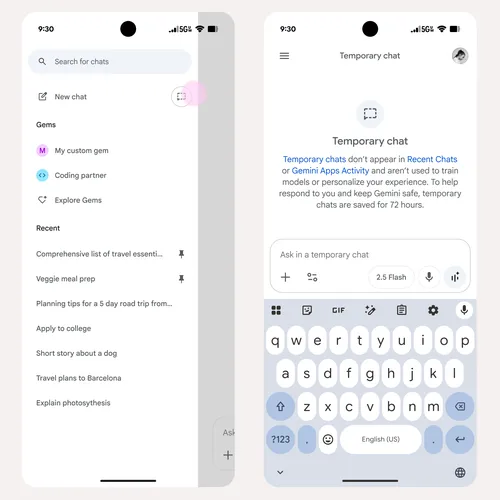
Step-by-Step Configuration
- Log in: Sign in to the Google Admin Console using an account with Gemini Settings administrator privileges. [1]
- Navigate: Go to Menu → Generative AI → Gemini app. [1]
- Select Conversation History: Click on Gemini conversation history. [1]
- Choose Target Users:
- To apply the setting globally, stay on the top-level organizational unit.
- To apply it selectively, choose a specific organizational unit or configuration group from the left-hand panel. [1]
- Adjust Toggles: Check or uncheck the following options according to your organization’s policy:
- Allow temporary chats: Enables users to have quick conversations that are excluded from their history and activity tracking.
- Allow users to delete conversations: Empowers users to manually wipe out individual chats or clear their entire history. [1, 2]
- Save Changes: Click Save. [1]
Important Retention & Compliance Notes
- Default State: Google leaves both temporary chats and conversation deletion toggled On by default.
- Google Vault Integration: If your enterprise enforces data retention using Google Vault, local user deletions or temporary chat states are overridden. While the conversations disappear from the end-user’s application screen, the backend data remains fully retrievable and searchable within Vault for eDiscovery purposes. [1, 3] Control whether
Read more
. SwiftUI previews and hot reload in Codex
. Google Fitbit Air is now HSA/FSA eligible in the U.S.
. Google strengthening our presence in Alabama through new investments and community support.
. Fluid, natural voice translation with Gemini 3.5 Live Translate
. 9100 PRO SSD: Power Inside of AI Pioneers | Samsung
. Carrier Link for Google Voice
. Inside the Race to Build AI Data Centers in Space
. Meet the world’s top AI-pilled economists
. What if your phone could unlock more creativity? | June Pixel Drop
. Google Health X Stephen Curry
. Google Pixel 10 Pro | With 100x Zoom
. June Pixel Drop: New features for creators, Gemini upgrades and more
. New discoverable space setting in Google Chat
. AI note-taking is now available in Google Voice
for more refer Gemini website click here
for more refer Artificial Intelligence website click here