


Join video conferences on Google Meet hardware via SIP through Pexip

Join video conferences on Google Meet hardware via SIP through Pexip
You can now join video conferences on Google Meet hardware via SIP through a Pexip interop gateway. This brings universal connectivity for users to join meetings hosted on any SIP-compatible platform directly from their Meet rooms. The functionality is available for room hardware based on both Android and ChromeOS.
The SIP functionality for Meet hardware enables critical in-meeting interactions, such as DTMF (Dual-Tone Multi-Frequency) capabilities that allow users to navigate meeting IVRs (interactive voice response systems), e.g., “Press 1 to raise your hand” and entering numeric meeting passcodes.
Distinct administrator settings are provided for managing SIP dial-out functionality separately from other Pexip-based integrations.
 |
| Join SIP calls with a single touch from the room agenda |
 |
| SIP interoperability setting for administrators |
Getting started
- Admins: This feature will be off by default and can be disabled or enabled at the domain, OU, or group level. Visit the Help Center to learn more.
- End users: There is no end user setting for this feature.
Rollout pace
- Rapid Release and Scheduled Release domains: Gradual rollout (up to 15 days for feature visibility) starting on July 6, 2026
Availability
- Available to all Google Workspace customers with Google Meet hardware devices*
*Functionality requires a separate Pexip subscription
Resources
- Google Workspace Admin Help: Allow Meet hardware to join third-party video conferencing services
- Google Meet Hardware Help: Meet interoperability FAQ
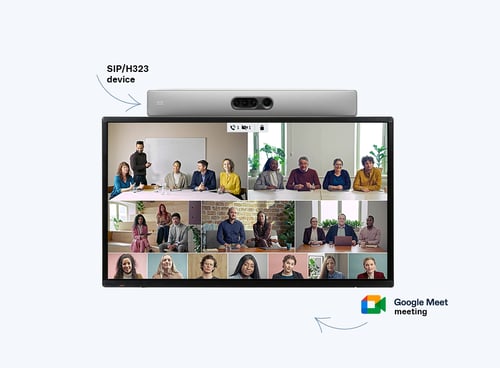
Key Features of the Integration
- Universal Platform Support: Connects your rooms to any standard SIP-based meeting service.
- Cross-OS Compatibility: Works seamlessly on Google Meet hardware running both Android and ChromeOS.
- Full DTMF Support: Allows users to use touch tones to enter numeric passcodes or navigate meeting IVR menus (e.g., “Press 1 to raise your hand”).
- Granular Admin Controls: Administrators can manage SIP dial-out permissions independently from other Pexip integrations. [1]
How to Join a SIP Meeting from Google Meet Hardware
Method 1: One-Touch Join (Scheduled Meetings)
- Invite the Room: Add your Google Meet hardware room to the calendar invitation containing the SIP meeting details.
- Locate the Meeting: Walk into the room and find your scheduled meeting on the Google Meet touch controller agenda.
- Tap to Join: Press the Join button on the panel to route the call transparently through the Pexip Interop Gateway. [1, 2, 3, 4, 5]
Method 2: Ad-Hoc Join (Using a Meeting Code)
- Open the Dial Pad: Tap Enter a code or nickname on the Google Meet hardware controller.
- Select the Platform: Choose the appropriate third-party platform or SIP option from the dropdown menu.
- Enter Details: Type in the numeric Meeting ID or SIP URI from your invitation.
- Authenticate: Enter the numeric passcode using the on-screen keypad if prompted. [6, 7]
Administrator Setup Requirements
- Enable Interoperability: Turn on third-party meeting interoperability under the Google Meet hardware settings.
- Link Pexip Gateway: Configure your Pexip Infinity or Pexip Connect service to act as the gateway handler.
- Configure Dial-Out Policies: Set up specific routing rules for external SIP dial-outs if your organization requires restricted access. [1, 8, 10, 11, 12]
Read more
. Group project, but make it 1776
. Japan’s answer to its worker shortage: An AI model for 10 million robots
. GPT 5.6, Mythos ban lifted, realtime avatars, Seedance 2.5, brain ultrasound: AI NEWS
. Google investing $1 million in Africa’s indie game developers.
. How timber from a WWII airship hangar became part of Google campuses
. How we created the Fourth of July Doodle | Behind the Doodle
. Deploying retail AI to scale personalisation and customer insight
. AI Content Didn’t Stop Working, Your Metrics Did
. Anthropic deploys Claude Sonnet 5, Fable and Mythos restored
. Full body waif us, Claude Fable is back, Long Cat 2.0, mind-reading AI, live video editing: AI NEWS
. Science-Backed E20 Fuel: Engineered for Reliable, High-Performance Journeys
. What is E20 Petrol? Meaning, Benefits, Impact & Compatibility Explained
. Cristiano Ronaldo Emotional Moments 😢💔 | Never Give Up Legend 🐐⚽
. Voice Coding Demo: MAI-Code-1-Flash Microsoft AI Models
. Big news for Jodhpur! A world-class airport terminal is here
. MCP vs API: Why traditional APIs are failing AI agents
. A new way to connect and earn with gifts
. What’s at the center of Claude’s mind?
for more refer Gemini website click here
for more refer Artificial Intelligence website click here
Join video conferences on Google Meet hardware via SIP through Pexip