


Here are few simple steps to generate DLC using Aadhaar Face Authentication
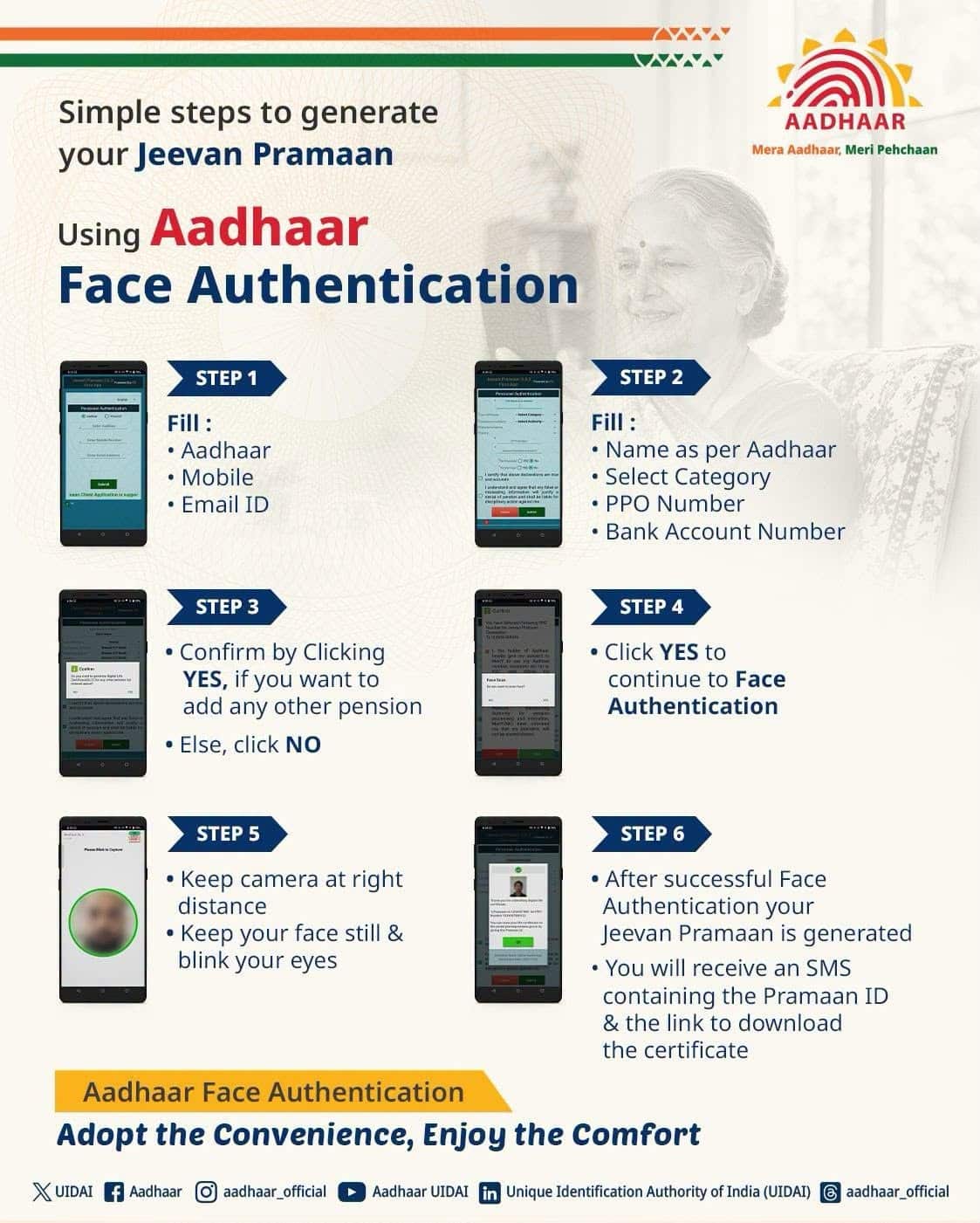
Here are few simple steps to generate DLC using Aadhaar Face Authentication
Pensioners can generate their Digital Life Certificate (Jeevan Pramaan) from home using a smartphone camera with Aadhaar Face Authentication. This eliminates the need to visit a bank branch or Common Service Centre. [1, 2]
Prerequisites
Keep these items ready before starting the process:
- Smartphone and Internet. An Android or iOS smartphone with a working front camera and an active internet connection.
- Aadhaar and Mobile Number. Your Aadhaar number linked to an active mobile number for receiving OTPs.
- Pension Details. Your Pension Payment Order (PPO) number, bank account number, sanctioning authority, and disbursing agency details. [1, 2, 3]
Step-by-Step Guide
- Install Required Apps. Download and install both the AadhaarFaceRD app and the Jeevan Pramaan app from the Google Play Store or Apple App Store. You can also find official download links on the Jeevan Pramaan Portal. [1, 2]
- Complete Operator Authentication. Open the Jeevan Pramaan app and enter the operator’s Aadhaar number, mobile number, and email address. Verify with the OTP, give consent, and scan the operator’s face (a pensioner can act as their own operator). [1, 2, 3]
- Enter Pensioner Details. On the pensioner authentication screen, enter your Aadhaar number, mobile number, and email address, then verify via OTP. [1]
- Fill in Pension Records. Input your full name, type of pension, sanctioning authority, disbursing agency, PPO number, and pension bank account number accurately. [1, 2]
- Submit Declarations and Consent. Answer the prompts regarding re-employment or remarriage, review the preview screen, and check the consent boxes. [1]
- Scan Your Face. Follow the on-screen instructions to position your face in a well-lit area and blink when prompted to complete the AadhaarFaceRD scan. [1, 2]
- Save Your Pramaan ID. Once submitted, an acknowledgement screen will display your Jeevan Pramaan ID, which is also sent via SMS so you can download the PDF certificate anytime. [1, 2]
If you’d like help troubleshooting a specific issue, let me know:
- Whether you are using an Android or iOS device
- Your pension category (such as Central Government, State Government, or EPS-95)
- Any error message you are seeing during the face scan
I can walk you through the exact fix or alternative steps like using the UMANG app.
Pensioners can generate their Digital Life Certificate (DLC), also known as Jeevan Pramaan, from home using the Jeevan Pramaan Portal or the UMANG App via Aadhaar Face Authentication on a smartphone, eliminating the need to visit a bank branch or office. [1, 2, 3]
System Requirements
- Devices: Un-rooted smartphones running Android 10.0+ or iOS 14.0+.
- Required Apps: Install both AadhaarFaceRD and Jeevan Pramaan Face App from the respective app store.
- Prerequisites: Active Aadhaar number, a mobile number linked to both Aadhaar and the pension bank account, and Pension Payment Order (PPO) details. [2, 3, 4]
Step-by-Step Process (via Jeevan Pramaan / Face App)
- Operator Authentication: Open the Face App, enter the operator’s Aadhaar and contact details, verify via OTP, and scan the operator’s face for consent. [4, 5]
- Pensioner Details & Declarations: Input the pensioner’s identification, PPO numbers, bank details, and any necessary declarations regarding re-employment or remarriage. [3, 4]
- Face Scan & Submission: Complete the pensioner’s face scan using the camera integration via AadhaarFaceRD and submit the application. [3, 4]
- Certificate Download: Receive a Jeevan Pramaan ID and download link via SMS, or retrieve the certificate directly within the app. [3, 5]
Read more
for more refer Gemini website click here
for more refer Artificial Intelligence website click here