


Wear OS 7 Overhaul: Google Wear Widgets Replace Traditional Tiles
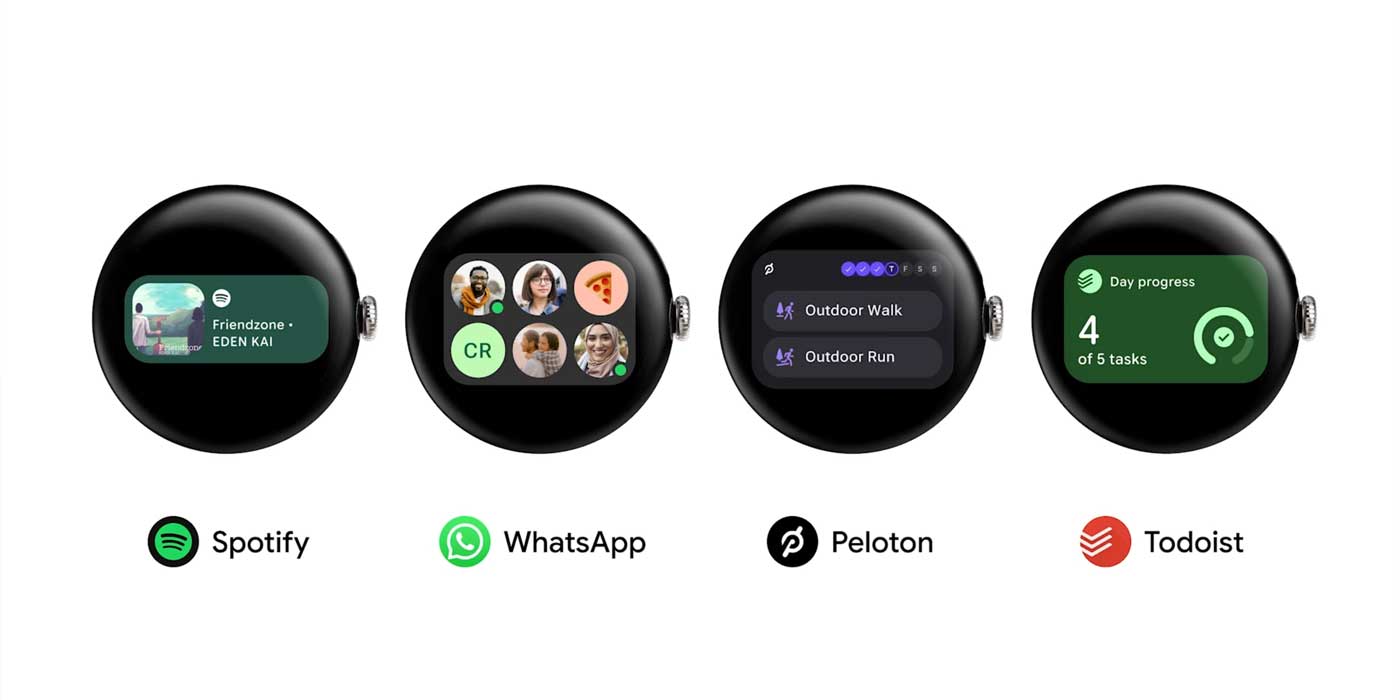
Google is quietly standardizing its wearable interface to mirror the modular layout of modern smartphones. Hot on the heels of the Wear OS 7 platform announcement at Google I/O 2026, Google has detailed a massive shift in how glanceable information functions on your wrist: Traditional full-screen Tiles are officially transitioning into “Wear Widgets.”
By moving away from rigid, full-screen card layouts, the updated ecosystem embraces Android’s Material 3 Expressive design language. This shift unifies the widget architecture across your smartphone, tablet, Android Auto dashboard, and smartwatch—massively reducing the development overhead required to build rich, bite-sized software tools for the wrist.
📐 The Structural Shift: Modular 2×1 and 2×2 Formats
Since the inception of modern smartwatches, “Tiles” have operated as full-bleed, edge-to-edge static pages. To check multiple metrics, users were forced to swipe through an increasingly long carousel of full-screen layers.
Wear Widgets break this rigid design rule by dividing the round display panel into standardized grid blocks, introducing two distinct layouts:
  [ 2×1 Layout (Small) ]  ──► Focused, single-metric slot (e.g., Unread chats, Daily Step count)
  [ 2×2 Layout (Large) ]  ──► Comprehensive, multi-row dashboard (e.g., Media playback controls)
Fluid Adaptation and Backward Compatibility
To avoid breaking current layouts, the new framework is incredibly flexible across different watch styles and hardware iterations:
-
The Pixel Watch Approach: On watches that prioritize a seamless horizontal swipe carousel, large 2×2 widgets will scale dynamically to look like clean, full-screen tiles.
-
The Galaxy Watch Multi-Info Matrix: Samsung’s latest Galaxy Watch lines run a customized One UI Watch skin that relies heavily on “stacked” paging or multi-info layouts next to the watch face. The new Wear Widgets integrate directly into these multi-info columns, allowing third-party tools to sit side-by-side inside spaces previously restricted to Samsung’s proprietary software.
-
Backward Compatible to Wear OS 4: In a major win for device longevity, Google confirmed that the underlying APIs are fully backward compatible with hardware running Wear OS 4 and above.
🚀 Powered by Remote Compose: Smooth Animations & Battery Savings
The structural magic behind Wear Widgets is a new UI framework called Remote Compose. Designed explicitly for handling glanceable, out-of-app user interfaces, this system shifts the heavy lifting away from power-hungry background application processes.
🔋 The 10% Battery Bump: Because Remote Compose allows the watch face layer to handle localized touch interactions and rich animations natively without constantly waking up full applications in the background, Google notes that transitioning from legacy Tiles to Wear Widgets forms a cornerstone of Wear OS 7’s promised 10% overall battery life improvement.
📱 First Apps with Native Support
Google revealed its early access developer partners who have already successfully migrated their glanceable watch faces from imperative builders over to declarative Remote Compose widgets. The first wave includes heavy-hitting utility and media apps:
-
🟢 Spotify: Features a rich 2×2 widget displaying album artwork fades, track progress sliders, and responsive skip controls.
-
🟢 WhatsApp: Provides rapid-access 2×1 slots mapping your top unread conversation queues or a direct microphone launcher for on-the-go voice notes.
-
🟢 Peloton: Drops a concise activity monitor showing your active streak statistics and direct shortcut nodes to launch target workout modes.
-
🟢 Todoist: Displays an elegant task tracker that reveals your top three upcoming chronological check-items with instant toggle-complete targets.
📊 Feature Comparison: Tiles vs. Wear Widgets
| Design Specification | Legacy Wear OS Tiles | Next-Gen Wear Widgets (Wear OS 7) |
| Grid Geometry | Hard-locked full-bleed page cards. | Modular 2×1 (Small) and 2×2 (Large) frames. |
| Developer Base | Proprietary ProtoLayout structures. | Unified Android Glance / Remote Compose framework. |
| System Interaction | Static swipe panels with slow load states. | Live background interactions without waking apps. |
| Ecosystem Portability | Exclusive to Wear OS devices. | Cross-shared layouts scale to Android phones & Auto. |
RELATED POST
. Google Search ads generative UI, AI booking tools and search agents
. We’re introducing new ways to design in real time with Stitch.
. I/O ’26 Recap: Everything You Need to Know
. Introducing Gemini Omni: Create Anything from Anything
. TPU Training Day for I/O ‘26
. The Gemini app becomes more agentic, delivering proactive, 24/7 help
. Fuel your next wave of growth on YouTube with Demand Gen
. Everything Google announced at I/O 2026: Gemini, Search, Android XR, & more
OTHER