
Skip to content
Tax Heal
Follow us on Twitter Follow us on Facebook Follow us on Instagram Follow us on LinkedIn Follow us on rss
  • Home
    • GST Online Course
  • GST Update
    • GST Returns Due Dates
    • Eway Bill
    • GST Act
      • CGST Act 2017
      • UTGST Act 2017
      • IGST Act 2017
      • CGST Ordinance
      • CGST ( Extention to Jammu and Kashmir ) Act 2017
      • IGST Ordinance
      • CGST Bill 2017- As Passed by Lok Sabha
      • UTGST Bill 2017 As Passed by Lok Sabha
      • UTGST Bill 2017 As Introduced Lok Sabha
      • Compensation to States 2017 Act
      • CGST Bill 2017 As Introduced in Lok Sabha
      • IGST Bill 2017 As Passed by Lok Sabha
      • IGST Bill 2017 As Introduced in Lok Sabha
      • Revised Model GST Law (Nov 2016)
      • Model GST Law ( June 2016 )
      • Model IGST Law (Nov 2016)
      • GST Compensation Bill 2017 As Passed by Lok Sabha
      • GST Compensation Bill 2017 As Introduced in Lok Sabha
    • SGST Act
      • SGST Acts
    • GST Rules and Forms
      • CGST Rules 2017
      • IGST Rules 2017
      • GST Forms
      • Draft GST Rules
        • Accounts and Records -April 2017
        • Appeals and Revisions – April 2017
        • Advance Ruling – April 2017
        • E Way Bill Rules April 2017
        • Assessment and Audit Rules – April 2017
        • Composition Rules – March 2017
        • Valuation Rules March 2017
        • Transitional Provisions Rules March 2017
        • Input Tax Credit Rules March 2017
        • Refund Rules March 2017
        • Payment of Tax Rules March 2017
        • Registration Rules March 2017
        • Return Rules March 2017
        • Revised Tax Invoice Rules March 2017
        • ITC Mismatch report-Sept 2016
        • Refund Forms-Sept 2016
        • Payment Rules -Sept 2016
        • Payment formats-Sept 2016
        • Invoice Rules-Sept 2016
        • Invoice formats-Sept 2016
        • Registration Rules-Sept 2016
        • Registration formats- Sept 2016
        • Return Rules-Sept 2016
        • Return Formats-Sept 2016
        • Tax Audit Report: GSTR-9B-Sept 2016
    • Notifications
      • Updated Notifications
      • Central Tax
      • Central Tax Rate
      • Integrated Tax
      • Integrated Tax Rate
      • Union Territory Tax
      • Union Territory Tax Rate
      • Compensation Cess
      • Compensation Cess Rate
    • Circulars
      • Central Tax Circulars / Orders
      • Integrated Tax Circular
    • GST Council
    • GST Judgments
    • GST Rates
      • GST Rates Goods
      • GST Rate – Services with Exemption List
      • GST Cess Rates
      • IGST Exemptions/Concessions List
    • Commentary on GST
    • GST Press Release
    • FAQ’s on GST
      • FAQ on GST by CBEC March 2017
      • FAQ on GST by CBEC- Sep 16
      • FAQs on GST-Aug 16
    • Video Tutorial-GST
    • GST History and Background Material
      • Background Material
        • GST Concept
        • GST Presentation-CBEC
        • CBEC
        • ICAI
  • Artificial Intelligence
  • Income Tax
    • Income Tax
      • Income Tax Commentary
      • Income Tax Press Release
      • Important Sections
      • Income Tax Forms
      • Important Rules
      • Income Tax Notification
      • Income Tax Circular
      • Income Tax Instructions
      • Income Tax Office Memorandum
      • Income Tax Judgments
      • Income Tax Video
    • Benami Property
    • PMGKY 2016
    • ICDS
      • ICDS-I
      • ICDS-II
      • ICDS-III
      • ICDS-IV
      • ICDS-V
      • ICDS-VI
      • ICDS-VII
      • ICDS-VIII
      • ICDS-IX
      • ICDS- X
    • Union Budget
      • Budget FY 2017-18
    • Direct Tax Dispute Resolution Scheme
  • Books
    • New Releases in Book Store
    • GST
    • CA Exam
      • CA Final
      • CA -IPCC
    • CS Exam
      • CS Executive Exam Books
    • CMA Exam
    • Income Tax
    • Companies Act
    • Service Tax
    • FEMA
    • Law
    • Business
    • Accounting Standards
    • Auditing
    • Insurance
    • Real Estate
    • IT
    • Negotiable Instruments
    • Financial Management
  • Finance
    • FEMA
    • Company
      • Companies Act 2013
      • Accounting Standard
    • Service Tax
      • Excise and custom
        • Excise
        • Central Excise (N.T) Notifications
        • Cenvat Credit
        • Custom
    • other Acts
      • Real Estate Act 2016
        • Real Estate Books
      • Negotiable Instruments Act
      • Gujarat Vat Act
      • Chhattisgarh VAT
      • Haryana Vat Act
      • KERALA VALUE ADDED TAX
      • Uttarakhand Value Added Tax Act
      • Information Technology Act
      • Competition Act 2002
      • CST
    • Audit
    • RBI
    • SEBI
    • IFRS
    • IRDA
    • Notifications
    • Supreme Court Judgment
    • Empanelment
    • International Taxation
    • Books
      • Australia
      • China
      • Vietnam
    • Judgements
    • Accounting Standards
      • Ind AS- An Overview -ICAI Edition 2016
      • Books
    • Submit Articles
    • Guidance Note
    • Free Downloads
    • Labour Laws
    • Insolvency and Bankruptcy Code 2016
    • TaxHeal Mobile App
  • Bank
  • History
  • News
    • Knowledge
  • USA IRS

New and improved: GitHub Copilot harness, agent skills, and richer context

By Ashwani Kumar | September 18, 2026
0 Comment

New and improved: GitHub Copilot harness, agent skills, and richer context

New and improved: GitHub Copilot harness, agent skills, and richer context

Content types

  • Monthly Updates

Topics

  • Azure integrations
  • Developer tools
  • Extensibility

Microsoft Copilot Studio is giving makers new ways to build agents that can reason through complex work, draw on richer context, and use a growing range of tools and capabilities to get real work done.

At the center of the latest Copilot Studio updates is the general availability of the GitHub Copilot harness, the new foundation for building reasoning-heavy agents and workflows in Copilot Studio. Alongside the harness, recent updates add new ways for agents to use skills, memory, enterprise knowledge, workflows, model context protocol (MCP) servers, connected agents, files, and more.

Explore Copilot Studio

Build agents and workflows for complex business processes with the GitHub Copilot harness

The GitHub Copilot harness is now generally available in Copilot Studio. This advanced harness is designed for reasoning-heavy agents and workflows that need to complete complex business processes.

The harness sits between the AI model and the agent or workflow you build, orchestrating how the components work together. It helps determine when to call the model, what context to provide, and which tools, MCP servers, or connected agents to use. This allows agents and workflows to plan steps and adapt their approach as they work toward the defined goal in a recursive manner. Basically, rather than relying on predefined paths, the agent or workflow can adjust its execution path based on the goal and the available inputs.
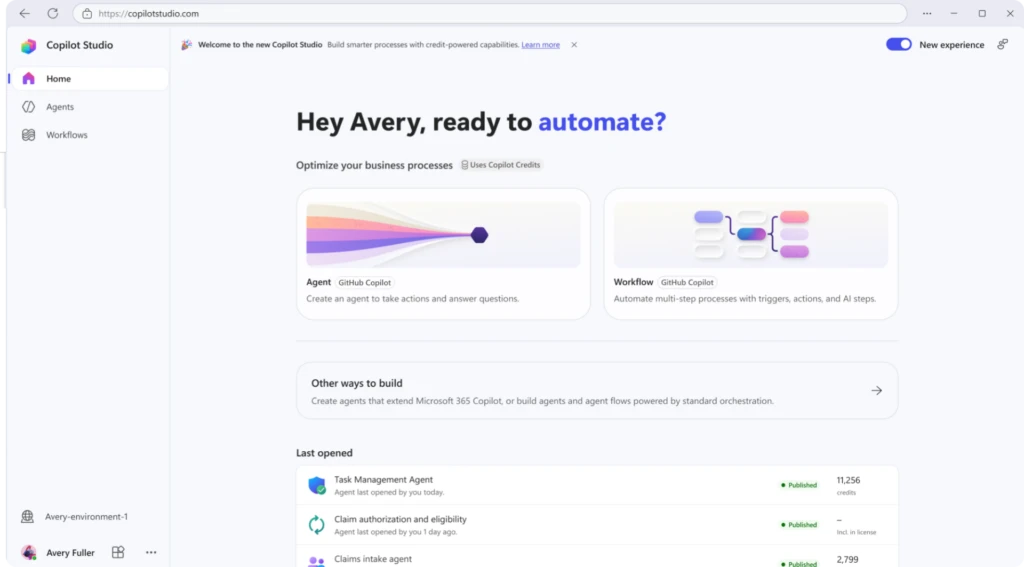
Copilot Studio home page with agent and workflow creation cards, recent projects, and navigation for building AI-powered automations.
Get the white paper: Choosing a harness

The harness also supports capabilities like skills and memory (see next section) and can natively create and edit Word, Excel, PowerPoint, and PDF files. Each task runs in a secure sandbox governed by Copilot Studio.

All this makes the GitHub Copilot harness particularly well suited for scenarios that combine reasoning with action across multiple steps. For example, an accounts payable agent could read invoices, match them to purchase orders, gather missing information, and route exceptions for approval.

The GitHub Copilot harness is available alongside the standard harness, so you can choose the foundation that best fits what you’re building. Learn more about choosing a harness.

Expand what your agents can do with skills, tools, and connected agents

The most useful agents can do more than answer questions. New capabilities for agents powered by the GitHub Copilot harness give you more ways to equip agents for the work you want them to perform:

  • Skills let you package instructions into modular, reusable capabilities. Write a skill or upload an existing skill, add it to multiple agents, and share it with your teammates. This feature helps teams reuse proven approaches instead of rebuilding the same capability for every agent.
  • For larger solutions, connected agents (in preview) let a primary agent delegate requests to specialized agents. This can help you create modular agent architectures where one agent serves as the front door and calls specialists for particular tasks.
  • Now in generally available, you can also add workflows and MCP servers as tools. Workflows can give agents access to multistep deterministic automation, while MCP servers can connect them to external services and capabilities.
  • With the Windows 365 for Agents MCP server, now generally available, agents can interact with a Windows 365 Cloud PC to work with desktop applications, browsers, and user interfaces.

The goal with these capabilities is to help teams move from building isolated agents to creating reusable, extensible agent solutions. Being able to build on proven components and specialized capabilities means complex agents are easier to develop, maintain, and scale across the organization.

Give agents richer context with knowledge, memory, and files

The right context can help an agent deliver more relevant responses and take more appropriate actions as it works.

With Work IQ in Copilot Studio (preview), agents powered by the GitHub Copilot harness can connect to organizational context such as emails, calendar events, files, Microsoft Teams messages, and people information. You can also connect an agent to Foundry IQ to use a knowledge base you’ve already built and tuned in Microsoft Foundry.
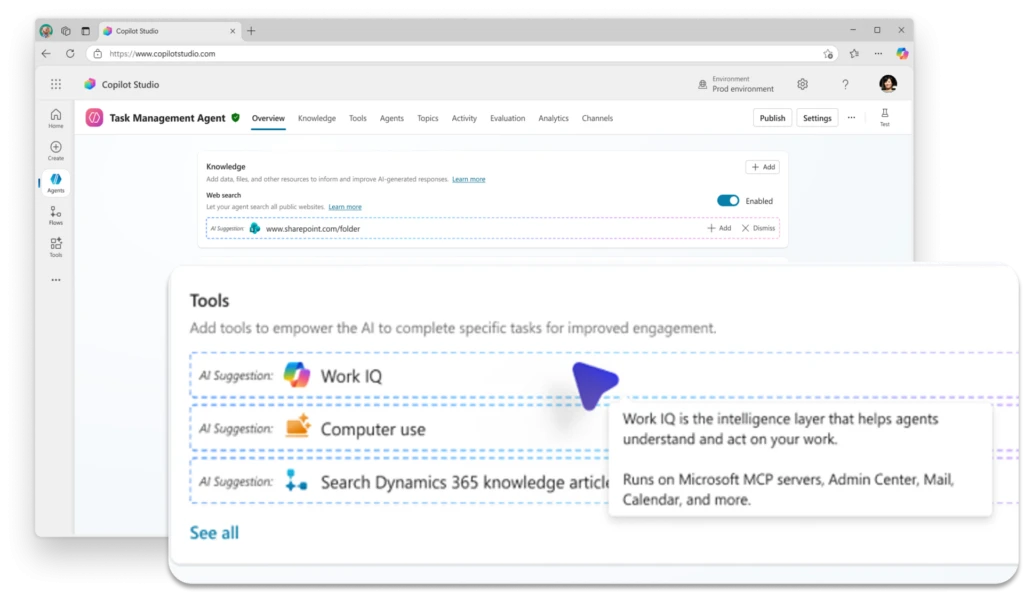
Copilot Studio agent configuration page with AI-suggested tools, highlighting Work IQ as a recommended tool for accessing workplace knowledge and business data.

Memory (also in preview) adds another source of context by allowing an agent to retain relevant information from previous interactions with an individual user. When enabled, memory can capture preferences and patterns and apply them in later conversations, helping you build experiences that become more relevant over time.

Agents can also take on larger, more complex document-based work. Now in preview, users can give agents files to analyze and work with directly, unlocking scenarios that require agents to reason over substantial documents and use what they find to complete a broader task. Users can also view files the agent creates during the conversation.

These capabilities all help agents work with a deeper understanding of the organization, the task, and the individual user. That richer context can reduce the need for users to repeatedly supply information and help agents not only deliver more relevant responses, but support more complex, ongoing work.

Manage agents with greater visibility and control

New Copilot Studio capabilities give administrators more ways to manage agents within their existing security and governance practices. Recent updates strengthen agent-level identity, expand environment-level observability, and add new trust signals for MCP servers.

First, as of July 2026, Copilot Studio automatically creates a Microsoft Entra Agent ID for every new agent. This gives individual agents their own identity in Microsoft Entra and helps administrators apply identity and access controls at the agent level.

For agents using MCP servers, you can also now submit an MCP server for Microsoft certification. Certification provides customers and administrators with additional information that an MCP server has been evaluated against Microsoft expectations for areas including reliability, security, compliance, and responsible operation.

Finally, with environment-level agent telemetry, now in preview, administrators can export telemetry from Copilot Studio to Application Insights through the Microsoft Power Platform admin center. Use this feature to validate agent runs, monitor tool execution, create alerts, and build custom dashboards for operational analysis.

Together, these updates help organizations treat agents as governed enterprise assets, with clearer identity, trusted connections, and the operational insight administrators need to manage them confidently at scale.

Reach customers across voice and digital channels with real-time agents

Real-time agents are expanding capabilities and channels. You now have new options for where you deploy them, how you customize voice experiences, and how you monitor performance.

Person wearing a headset uses a laptop at a desk in an office workspace while another person works at a nearby desk in the background.

Previously available for voice experiences, real-time agents can now also be deployed to digital messaging channels. Currently in preview, this feature allows you to use the same agent configuration across voice and digital messaging to create more consistent, context-aware customer experiences without maintaining separate agents for each channel.

For voice experiences, you can now use GPT-5 Chat. The model, also in preview, uses a text-based voice architecture that converts speech to text, generates a response, and synthesizes it back to speech. This enables advanced voice customization with neural text to speech, as well as greater deployment flexibility.

Finally, you can monitor real-time agents with Application Insights in Azure Monitor, which gives you more visibility into agent performance and helps you identify and troubleshoot issues.

Learn more about real-time agents and best practices for managing them at scale.

More improvements to help you build

A few more Copilot Studio updates help make everyday agent authoring more flexible:

  • Choose from more models. Claude Sonnet 5 and GPT-5.5 Chat are now generally available as primary models, giving you more options to match model capabilities to your agent scenario.
  • Build with the right foundation for the job. With multiple harness options available in Copilot Studio, you can choose between reasoning-heavy, multi-step experiences and more structured, predictable agent scenarios based on what you need to build.

The latest Copilot Studio updates give makers more building blocks for agents that can reason, act, collaborate, and work with richer context—while giving organizations more ways to manage those capabilities as their agent ecosystems grow.

What comes next

The significance of these updates goes beyond any single feature. Copilot Studio now has more of the building blocks needed for agents to take on consequential business processes: stronger reasoning, reusable capabilities, richer context, more ways to act, and enterprise controls to support them.

That opens the door to a much broader range of agent use cases. As makers begin combining these capabilities in new ways, the question is shifting from what an agent can do toward what work an organization is ready to give it.

Stay up to date on all things Copilot Studio

More is coming across voice channels, workflows, and the building experience. Check out all the updates as we ship them, as well as new features releasing in the next few months here: What’s new in Microsoft Copilot Studio.

Reimagine business processes

Discover how AI agents can help your organization work smarter and move faster.

Explore Copilot Studio

Read more

. Automatic room check-in for Google Meet available on mobile devices

. Create and edit calculated fields in Google Sheets pivot tables with an improved editor

. Go behind closed doors at the Artemis II test facility | Searching

. Google Gemini Back to School 2026

. Make AI Max work for your business with new testing and planning tools.

. Doubled cell limits in Google Sheets now generally available

. Manage external sharing for Gemini Notebook in the Admin console

. Introducing JioTag 2

. Inside the Gemmaverse: Celebrating one billion Gemma downloads

. Personalize the content you see on Search, Discover, and News

. Gemini in Google Sheets is now available on Android devices


. The Gemini desktop app is now available for Windows

. macOS 27 Golden Gate is INCREDIBLE! – First 15 Things

. Take an interactive journey through America’s national parks

. Seamlessly import your team and data from Microsoft to Google Workspace during setup

. Google Workspace Weekly Recap – September 11, 2026

. Set up sharing boundaries for Google Drive with unified data protection rules

. GPT-Live-1 is now in the API

for more refer Gemini website click here

for more refer Artificial Intelligence  website click here

Category: Artificial Intelligence Tags: Copilot studio agent version history, Copilot studio new experience reddit, Copilot Studio new UI, Copilot studio preview url, Copilot Studio release plan, Copilot studio switch to new experience, GitHub Copilot harness, microsoft 365, Microsoft account, Microsoft AI chatbot, Microsoft AI Copilot, Microsoft AI course, Microsoft AI image generator, Microsoft AI logo, Microsoft AI name, Microsoft AI video Generator, Microsoft Copilot, Microsoft Copilot Studio new features, Microsoft download, Microsoft founder, Microsoft login, microsoft office, Microsoft Store, Microsoft Word, New and improved, New Copilot Studio experience
Post navigation
← GPT-Live-1 is now in the API

Categories


Tax Heal Youtube Channel

https://youtu.be/jlzygPLPNno
September 2026
M T W T F S S
 123456
78910111213
14151617181920
21222324252627
282930  
« Aug    

Bank

Dont Forget to Subscribe for Latest Updates and News

Enter your email address:

Delivered by FeedBurner

Recent Posts

  • New and improved: GitHub Copilot harness, agent skills, and richer context
  • GPT-Live-1 is now in the API
  • Set up sharing boundaries for Google Drive with unified data protection rules
  • Google Workspace Weekly Recap – September 11, 2026
  • Seamlessly import your team and data from Microsoft to Google Workspace during setup
  • GST CASE LAWS 17.09.2026
  • GSTAT Grants Exemption From Ordinary Registry Scrutiny for Urgent Hearing to Restore Paralysed Business
  • Appellate Authority Directed to Entertain Appeal Beyond Limitation Period as Order Upload Caused Delay
  • Writ Relegated to Statutory Appeal as Rectified Form DRC-07 Resolved Summary Discrepancy
  • Unsigned Show Cause Notice and Order-in-Original are Jurisdictionally Defective and Legally Invalid Under GST Rules

TaxHeal

About Taxheal – Daily Tax ,GST & Law Updates Contact Us
  • Useful Links & GST
  • Disclaimer
  • New Releases in Book Store
  • TAXHEAL Mobile App Privacy Policy
  • National Company Law Tribunal
    Bank Concurrent Audit Procedure Manual

    Archives

    • September 2026
    • August 2026
    • July 2026
    • June 2026
    • May 2026
    • April 2026
    • March 2026
    • February 2026
    • January 2026
    • December 2025
    • November 2025
    • October 2025
    • September 2025
    • August 2025
    • July 2025
    • June 2025
    • May 2025
    • April 2025
    • March 2025
    • February 2025
    • January 2025
    • December 2024
    • November 2024
    • October 2024
    • September 2024
    • August 2024
    • July 2024
    • June 2024
    • May 2024
    • April 2024
    • March 2024
    • February 2024
    • January 2024
    • December 2023
    • November 2023
    • October 2023
    • September 2023
    • August 2023
    • July 2023
    • June 2023
    • May 2023
    • April 2023
    • March 2023
    • February 2023
    • January 2023
    • December 2022
    • November 2022
    • October 2022
    • September 2022
    • August 2022
    • July 2022
    • June 2022
    • May 2022
    • April 2022
    • March 2022
    • February 2022
    • January 2022
    • December 2021
    • November 2021
    • October 2021
    • September 2021
    • August 2021
    • July 2021
    • June 2021
    • May 2021
    • April 2021
    • March 2021
    • February 2021
    • January 2021
    • December 2020
    • November 2020
    • October 2020
    • September 2020
    • August 2020
    • July 2020
    • June 2020
    • May 2020
    • April 2020
    • March 2020
    • February 2020
    • January 2020
    • December 2019
    • November 2019
    • October 2019
    • September 2019
    • August 2019
    • July 2019
    • June 2019
    • May 2019
    • April 2019
    • March 2019
    • February 2019
    • January 2019
    • December 2018
    • November 2018
    • October 2018
    • September 2018
    • August 2018
    • July 2018
    • June 2018
    • May 2018
    • April 2018
    • March 2018
    • February 2018
    • January 2018
    • December 2017
    • November 2017
    • October 2017
    • September 2017
    • August 2017
    • July 2017
    • June 2017
    • May 2017
    • April 2017
    • March 2017
    • February 2017
    • January 2017
    • December 2016
    • November 2016
    • October 2016
    • September 2016
    • August 2016
    • July 2016
    • June 2016
    • May 2016
    • April 2016
    • March 2016
    • February 2016
    • January 2016
    • December 2015
    • November 2015
    • October 2015
    • September 2015
    • August 2015
    • July 2015
    • June 2015
    • April 2015
    • September 2014
    • April 2014
    • June 2013
    • April 2013
    • March 2012
    • August 2011
    • June 2011
    • April 2011
    • January 2011
    • April 2009
    • January 2009
    • February 2005
    • July 2001
    • June 2000
    • January 1998
    • April 1994
    • August 1989
    • June 1989
    • October 1988
    Tax Heal © 2014 - 2026. All rights reserved.
    CA Satbir Singh M-09872233989 Email-Taxheal@gmail.com
    Iconic One Theme | Powered by Wordpress