
Skip to content
Tax Heal
Follow us on Twitter Follow us on Facebook Follow us on Instagram Follow us on LinkedIn Follow us on rss
  • Home
    • GST Online Course
  • GST Update
    • GST Returns Due Dates
    • Eway Bill
    • GST Act
      • CGST Act 2017
      • UTGST Act 2017
      • IGST Act 2017
      • CGST Ordinance
      • CGST ( Extention to Jammu and Kashmir ) Act 2017
      • IGST Ordinance
      • CGST Bill 2017- As Passed by Lok Sabha
      • UTGST Bill 2017 As Passed by Lok Sabha
      • UTGST Bill 2017 As Introduced Lok Sabha
      • Compensation to States 2017 Act
      • CGST Bill 2017 As Introduced in Lok Sabha
      • IGST Bill 2017 As Passed by Lok Sabha
      • IGST Bill 2017 As Introduced in Lok Sabha
      • Revised Model GST Law (Nov 2016)
      • Model GST Law ( June 2016 )
      • Model IGST Law (Nov 2016)
      • GST Compensation Bill 2017 As Passed by Lok Sabha
      • GST Compensation Bill 2017 As Introduced in Lok Sabha
    • SGST Act
      • SGST Acts
    • GST Rules and Forms
      • CGST Rules 2017
      • IGST Rules 2017
      • GST Forms
      • Draft GST Rules
        • Accounts and Records -April 2017
        • Appeals and Revisions – April 2017
        • Advance Ruling – April 2017
        • E Way Bill Rules April 2017
        • Assessment and Audit Rules – April 2017
        • Composition Rules – March 2017
        • Valuation Rules March 2017
        • Transitional Provisions Rules March 2017
        • Input Tax Credit Rules March 2017
        • Refund Rules March 2017
        • Payment of Tax Rules March 2017
        • Registration Rules March 2017
        • Return Rules March 2017
        • Revised Tax Invoice Rules March 2017
        • ITC Mismatch report-Sept 2016
        • Refund Forms-Sept 2016
        • Payment Rules -Sept 2016
        • Payment formats-Sept 2016
        • Invoice Rules-Sept 2016
        • Invoice formats-Sept 2016
        • Registration Rules-Sept 2016
        • Registration formats- Sept 2016
        • Return Rules-Sept 2016
        • Return Formats-Sept 2016
        • Tax Audit Report: GSTR-9B-Sept 2016
    • Notifications
      • Updated Notifications
      • Central Tax
      • Central Tax Rate
      • Integrated Tax
      • Integrated Tax Rate
      • Union Territory Tax
      • Union Territory Tax Rate
      • Compensation Cess
      • Compensation Cess Rate
    • Circulars
      • Central Tax Circulars / Orders
      • Integrated Tax Circular
    • GST Council
    • GST Judgments
    • GST Rates
      • GST Rates Goods
      • GST Rate – Services with Exemption List
      • GST Cess Rates
      • IGST Exemptions/Concessions List
    • Commentary on GST
    • GST Press Release
    • FAQ’s on GST
      • FAQ on GST by CBEC March 2017
      • FAQ on GST by CBEC- Sep 16
      • FAQs on GST-Aug 16
    • Video Tutorial-GST
    • GST History and Background Material
      • Background Material
        • GST Concept
        • GST Presentation-CBEC
        • CBEC
        • ICAI
  • Artificial Intelligence
  • Income Tax
    • Income Tax
      • Income Tax Commentary
      • Income Tax Press Release
      • Important Sections
      • Income Tax Forms
      • Important Rules
      • Income Tax Notification
      • Income Tax Circular
      • Income Tax Instructions
      • Income Tax Office Memorandum
      • Income Tax Judgments
      • Income Tax Video
    • Benami Property
    • PMGKY 2016
    • ICDS
      • ICDS-I
      • ICDS-II
      • ICDS-III
      • ICDS-IV
      • ICDS-V
      • ICDS-VI
      • ICDS-VII
      • ICDS-VIII
      • ICDS-IX
      • ICDS- X
    • Union Budget
      • Budget FY 2017-18
    • Direct Tax Dispute Resolution Scheme
  • Books
    • New Releases in Book Store
    • GST
    • CA Exam
      • CA Final
      • CA -IPCC
    • CS Exam
      • CS Executive Exam Books
    • CMA Exam
    • Income Tax
    • Companies Act
    • Service Tax
    • FEMA
    • Law
    • Business
    • Accounting Standards
    • Auditing
    • Insurance
    • Real Estate
    • IT
    • Negotiable Instruments
    • Financial Management
  • Finance
    • FEMA
    • Company
      • Companies Act 2013
      • Accounting Standard
    • Service Tax
      • Excise and custom
        • Excise
        • Central Excise (N.T) Notifications
        • Cenvat Credit
        • Custom
    • other Acts
      • Real Estate Act 2016
        • Real Estate Books
      • Negotiable Instruments Act
      • Gujarat Vat Act
      • Chhattisgarh VAT
      • Haryana Vat Act
      • KERALA VALUE ADDED TAX
      • Uttarakhand Value Added Tax Act
      • Information Technology Act
      • Competition Act 2002
      • CST
    • Audit
    • RBI
    • SEBI
    • IFRS
    • IRDA
    • Notifications
    • Supreme Court Judgment
    • Empanelment
    • International Taxation
    • Books
      • Australia
      • China
      • Vietnam
    • Judgements
    • Accounting Standards
      • Ind AS- An Overview -ICAI Edition 2016
      • Books
    • Submit Articles
    • Guidance Note
    • Free Downloads
    • Labour Laws
    • Insolvency and Bankruptcy Code 2016
    • TaxHeal Mobile App
  • Bank
  • History
  • News
    • Knowledge
  • USA IRS

Configure Access Management and Access Approvals policies using classification labels with rules in Assured Controls

By Ashwani Kumar | October 19, 2026
0 Comment

Configure Access Management and Access Approvals policies using classification labels with rules in Assured Controls

Configure Access Management and Access Approvals policies using classification labels with rules in Assured Controls

Configure Access Management and Access Approvals policies using classification labels with rules in Assured Controls

Google introducing Assured Controls rules in the Google Workspace Admin Console, giving administrators a more granular, resource-centric way to enforce Access Management and Access Approvals policies on Google Drive files.

Previously, Access Management and Access Approvals policies could only be scoped at the user level, applying broadly to all covered data owned by users within a selected Organizational Unit (OU) or group. With Assured Controls rules, admins can now configure both Access Management and Access Approvals policies together in a single unified rule and target specific Google Drive files using classification labels in addition to existing OU and group-based scoping capabilities.

By scoping Assured Controls policies to specific classification labels, organizations can reserve their strictest sovereign and compliance controls for only their most sensitive files while maintaining standard, rapid support workflows for less sensitive business data.

How organizations can use Assured Controls rules:


  • Automated end-to-end protection with Data Loss Prevention (DLP): Admins can combine data protection rules with Assured Controls rules to automatically apply Access Approvals and Access Management policies based on Drive file contents. A DLP rule can automatically apply a classification label when sensitive content (such as Personally Identifiable Information, financial records, or regulated project identifiers) is detected in a Drive file, which then automatically triggers the corresponding Assured Controls rule using that label as a condition to enforce Access Management and Access Approvals protections.
  • Regional data sovereignty across multinational teams: Multinational enterprises can apply regional classification labels (such as EU Restricted or U.S. Restricted) to Drive files and restrict access to EU or US support staff based on the contents of the file itself.
  • Targeted compliance for regulated workloads: Public sector and financial services organizations can apply a classification label (such as CJIS / IRS 1075) to sensitive Drive files and use an Assured Controls rule to restrict support actions on those files to CJIS-authorized and IRS 1075-authorized individuals while simultaneously requiring explicit Access Approvals—without impacting support speed for unclassified files owned by the same users.


Getting started


  • Admins: Use our Help Center to learn more about Assured Controls rules for Access Management & Access Approvals.
  • End users: There is no end user setting for this feature.


Rollout pace


  • Rapid Release and Scheduled Release domains: Gradual rollout (up to 15 days for feature visibility) started on September 30, 2026


Availability


  • Access Approvals rule-based enforcement: Available to Google Workspace Enterprise Plus and Frontline Plus customers with the Assured Controls or Assured Controls Plus add-on.
  • Access Management rule-based enforcement: Available to Google Workspace Enterprise Plus and Frontline Plus customers with the Assured Controls Plus add on.


Resources


  • Google Workspace Admin Help: Assured Controls rules for Access Management & Access Approvals 
  • Google Workspace Admin Help: Access Management: Limit the Google staff who can take support actions related to your data
  • Google Workspace Admin Help: Access Approvals: Require Google staff to request approval before viewing support data
  • Google Workspace Admin Help: About Assured Controls and Assured Controls Plus
  • Google Workspace Admin Help: What data is covered by Access Management and Access Approvals? 
  • Google Workspace Admin Help: Create data protection rules
  • Google Workspace Admin Help: Create classification labels for your organization
Configure Access Management and Access Approvals policies using classification labels with rules in Assured Controls

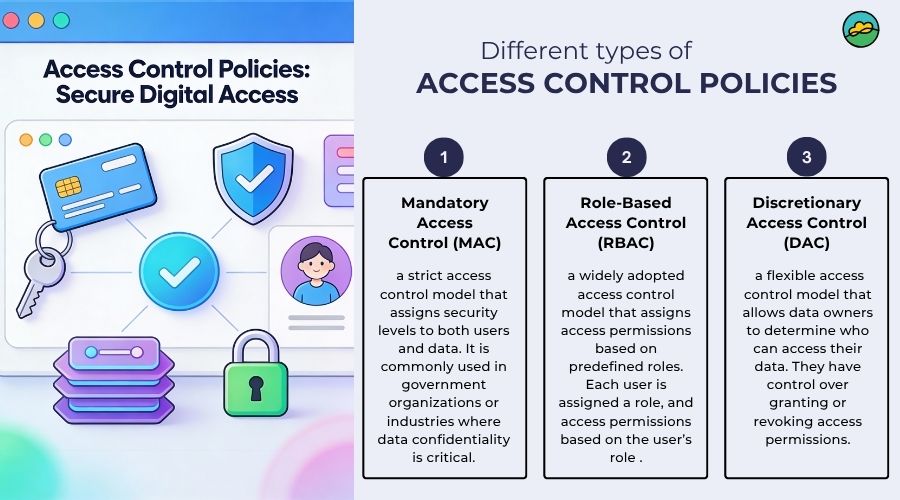
To configure Access Management and Access Approvals policies together using data classification labels, you must use the Assured Controls rules wizard inside the Google Workspace Admin Console. This allows you to enforce resource-centric, granular compliance policies on specific Google Drive files based on their applied sensitivity labels, rather than managing them solely via user organizational units (OUs) or groups. [1, 2]
Prerequisites & Licensing Requirements
  • Access Approvals Rule: Requires either the Google Workspace Assured Controls or Assured Controls Plus add-on.
  • Access Management Rule: Requires the Google Workspace Assured Controls Plus add-on.
  • Admin Privileges: You must be signed in as a Super Administrator.
  • Classification Labels: You must already have created and published the relevant data labels in the Label Manager. [1, 2, 3]

Step-by-Step Configuration Guide
  1. Navigate to Access Management:
    Log in to the Google Admin Console, open the left hand Menu, and navigate to Data ➔ Compliance ➔ Access Management.
    [1]
  2. Open the Rules Wizard:
    Under the Rule-based scoping section, click on Assured Controls rules to open the dedicated setup wizard.
    [1]
  3. Define Rule Criteria (Classification Labels):
    Within the setup wizard, select Data Classification Labels as your primary targeting scope. Pick the specific label or badge option (e.g., Highly Confidential, Sovereign Restricted) that you want to apply this rule to. You can also layer standard OU and group restrictions if needed.
    [1, 2, 3]
  4. Configure Access Management Policies:
    Select the location and credential requirements that Google personnel must meet before they can fulfill support requests related to files carrying that label.
    [1, 2]
  5. Configure Access Approvals Policies:
    Toggle on the requirement for Google staff to request and receive explicit permission from your designated authorized personnel before accessing any data linked to that classification label.
    [1, 2]
  6. Review and Save:
    Verify the combination of both policies in your unified rule layout and click Save / Finish.
    [1, 2]
Would you like assistance setting up the automatic application of these classification labels using Data Loss Prevention (DLP) rules, or should we look at how policy conflicts are resolved when multiple rules overlap?

Read more

. Tackle your to-do list with new features in our Google AI plans.

. A new deep learning model maps global methane emissions from space.

. Surface Laptop Ultra | Stepping into the future

. American DeepSeek is HERE: The New KING of Open Source AI

. Exploring Creative Intelligence with London’s Southbank Centre

. Drive profitable growth with new data and measurement tools

. Point-in-time editing now available in Google Vids

Carrier Link for Google Voice available in 14 additional countries

. Dreambeans: Daily stories, brewed just for you, now available to all accounts in the U.S.

. New logic and search steps in Workspace Studio help expand automation capabilities

. Meet Google Fitbit Edge | Coaching, right when you need it

. DevFest is back

. Google Meet now uses post-quantum cryptography

. Watch: Elon Musk’s ‘flying Tesla’ takes off, flips mid-air and lands safely in demo

for more refer Gemini website click here

for more refer Artificial Intelligence  website click here

Category: Artificial Intelligence Tags: AI Gemini, Assured Controls, classification, Configure Access Management, Facebook en Google, Gemini, Gemini AI, Gemini AI app, Gemini Live, Google, Google com sign in, Google Facebook number, Google Flow AI video, Google Gemini, Google Gemini AI photo, Google India careers, Google India Gemini, Google India office, Google News facebook, Google search image, Google trending facebook, Google workspace assured controls, Hey Google, whatsapp, Which is one of google cloud's seven trust principles, YouTube under Google
Post navigation
← Notifying Merchant Shipping Tribunal Members Qualification Experience and Submission of Award Rules 2026 under Merchant Shipping Act 2025 Now generally available: Preview client-side encrypted PDF and image files directly in Google Drive →

Categories


Tax Heal Youtube Channel

https://youtu.be/jlzygPLPNno
October 2026
M T W T F S S
 1234
567891011
12131415161718
19202122232425
262728293031  
« Sep    

Bank

Dont Forget to Subscribe for Latest Updates and News

Enter your email address:

Delivered by FeedBurner

Recent Posts

  • NCEF’s committing $10 million toward Nevada’s cleaner, more affordable energy future.
  • New insights from Google’s AI & Economy ATLAS
  • Now generally available: Preview client-side encrypted PDF and image files directly in Google Drive
  • Configure Access Management and Access Approvals policies using classification labels with rules in Assured Controls
  • Notifying Merchant Shipping Tribunal Members Qualification Experience and Submission of Award Rules 2026 under Merchant Shipping Act 2025
  • Nomination of Member under Section 3(3)(C) of NCAHP Act, 2021
  • Appointing Dr. Alok Tiwari, Joint Secretary, Ministry of Finance, as Member, IFSCA.
  • Notifying Coastal Shipping Licencing of Foreign Flag Vessels Rules 2026 under Coastal Shipping Act 2025
  • Notifying Merchant Shipping Bureau of Ports Security Rules 2026 under MS Act 2025
  • Notification regarding Govt. Contribution in respect of EPS, 2026

TaxHeal

About Taxheal – Daily Tax ,GST & Law Updates Contact Us
  • Useful Links & GST
  • Disclaimer
  • New Releases in Book Store
  • TAXHEAL Mobile App Privacy Policy
  • National Company Law Tribunal
    Bank Concurrent Audit Procedure Manual

    Archives

    • October 2026
    • September 2026
    • August 2026
    • July 2026
    • June 2026
    • May 2026
    • April 2026
    • March 2026
    • February 2026
    • January 2026
    • December 2025
    • November 2025
    • October 2025
    • September 2025
    • August 2025
    • July 2025
    • June 2025
    • May 2025
    • April 2025
    • March 2025
    • February 2025
    • January 2025
    • December 2024
    • November 2024
    • October 2024
    • September 2024
    • August 2024
    • July 2024
    • June 2024
    • May 2024
    • April 2024
    • March 2024
    • February 2024
    • January 2024
    • December 2023
    • November 2023
    • October 2023
    • September 2023
    • August 2023
    • July 2023
    • June 2023
    • May 2023
    • April 2023
    • March 2023
    • February 2023
    • January 2023
    • December 2022
    • November 2022
    • October 2022
    • September 2022
    • August 2022
    • July 2022
    • June 2022
    • May 2022
    • April 2022
    • March 2022
    • February 2022
    • January 2022
    • December 2021
    • November 2021
    • October 2021
    • September 2021
    • August 2021
    • July 2021
    • June 2021
    • May 2021
    • April 2021
    • March 2021
    • February 2021
    • January 2021
    • December 2020
    • November 2020
    • October 2020
    • September 2020
    • August 2020
    • July 2020
    • June 2020
    • May 2020
    • April 2020
    • March 2020
    • February 2020
    • January 2020
    • December 2019
    • November 2019
    • October 2019
    • September 2019
    • August 2019
    • July 2019
    • June 2019
    • May 2019
    • April 2019
    • March 2019
    • February 2019
    • January 2019
    • December 2018
    • November 2018
    • October 2018
    • September 2018
    • August 2018
    • July 2018
    • June 2018
    • May 2018
    • April 2018
    • March 2018
    • February 2018
    • January 2018
    • December 2017
    • November 2017
    • October 2017
    • September 2017
    • August 2017
    • July 2017
    • June 2017
    • May 2017
    • April 2017
    • March 2017
    • February 2017
    • January 2017
    • December 2016
    • November 2016
    • October 2016
    • September 2016
    • August 2016
    • July 2016
    • June 2016
    • May 2016
    • April 2016
    • March 2016
    • February 2016
    • January 2016
    • December 2015
    • November 2015
    • October 2015
    • September 2015
    • August 2015
    • July 2015
    • June 2015
    • April 2015
    • September 2014
    • April 2014
    • June 2013
    • April 2013
    • March 2012
    • August 2011
    • June 2011
    • April 2011
    • January 2011
    • April 2009
    • January 2009
    • February 2005
    • July 2001
    • June 2000
    • January 1998
    • April 1994
    • August 1989
    • June 1989
    • October 1988
    Tax Heal © 2014 - 2026. All rights reserved.
    CA Satbir Singh M-09872233989 Email-Taxheal@gmail.com
    Iconic One Theme | Powered by Wordpress