
Skip to content
Tax Heal
Follow us on Twitter Follow us on Facebook Follow us on Instagram Follow us on LinkedIn Follow us on rss
  • Home
    • GST Online Course
  • GST Update
    • GST Returns Due Dates
    • Eway Bill
    • GST Act
      • CGST Act 2017
      • UTGST Act 2017
      • IGST Act 2017
      • CGST Ordinance
      • CGST ( Extention to Jammu and Kashmir ) Act 2017
      • IGST Ordinance
      • CGST Bill 2017- As Passed by Lok Sabha
      • UTGST Bill 2017 As Passed by Lok Sabha
      • UTGST Bill 2017 As Introduced Lok Sabha
      • Compensation to States 2017 Act
      • CGST Bill 2017 As Introduced in Lok Sabha
      • IGST Bill 2017 As Passed by Lok Sabha
      • IGST Bill 2017 As Introduced in Lok Sabha
      • Revised Model GST Law (Nov 2016)
      • Model GST Law ( June 2016 )
      • Model IGST Law (Nov 2016)
      • GST Compensation Bill 2017 As Passed by Lok Sabha
      • GST Compensation Bill 2017 As Introduced in Lok Sabha
    • SGST Act
      • SGST Acts
    • GST Rules and Forms
      • CGST Rules 2017
      • IGST Rules 2017
      • GST Forms
      • Draft GST Rules
        • Accounts and Records -April 2017
        • Appeals and Revisions – April 2017
        • Advance Ruling – April 2017
        • E Way Bill Rules April 2017
        • Assessment and Audit Rules – April 2017
        • Composition Rules – March 2017
        • Valuation Rules March 2017
        • Transitional Provisions Rules March 2017
        • Input Tax Credit Rules March 2017
        • Refund Rules March 2017
        • Payment of Tax Rules March 2017
        • Registration Rules March 2017
        • Return Rules March 2017
        • Revised Tax Invoice Rules March 2017
        • ITC Mismatch report-Sept 2016
        • Refund Forms-Sept 2016
        • Payment Rules -Sept 2016
        • Payment formats-Sept 2016
        • Invoice Rules-Sept 2016
        • Invoice formats-Sept 2016
        • Registration Rules-Sept 2016
        • Registration formats- Sept 2016
        • Return Rules-Sept 2016
        • Return Formats-Sept 2016
        • Tax Audit Report: GSTR-9B-Sept 2016
    • Notifications
      • Updated Notifications
      • Central Tax
      • Central Tax Rate
      • Integrated Tax
      • Integrated Tax Rate
      • Union Territory Tax
      • Union Territory Tax Rate
      • Compensation Cess
      • Compensation Cess Rate
    • Circulars
      • Central Tax Circulars / Orders
      • Integrated Tax Circular
    • GST Council
    • GST Judgments
    • GST Rates
      • GST Rates Goods
      • GST Rate – Services with Exemption List
      • GST Cess Rates
      • IGST Exemptions/Concessions List
    • Commentary on GST
    • GST Press Release
    • FAQ’s on GST
      • FAQ on GST by CBEC March 2017
      • FAQ on GST by CBEC- Sep 16
      • FAQs on GST-Aug 16
    • Video Tutorial-GST
    • GST History and Background Material
      • Background Material
        • GST Concept
        • GST Presentation-CBEC
        • CBEC
        • ICAI
  • Artificial Intelligence
  • Income Tax
    • Income Tax
      • Income Tax Commentary
      • Income Tax Press Release
      • Important Sections
      • Income Tax Forms
      • Important Rules
      • Income Tax Notification
      • Income Tax Circular
      • Income Tax Instructions
      • Income Tax Office Memorandum
      • Income Tax Judgments
      • Income Tax Video
    • Benami Property
    • PMGKY 2016
    • ICDS
      • ICDS-I
      • ICDS-II
      • ICDS-III
      • ICDS-IV
      • ICDS-V
      • ICDS-VI
      • ICDS-VII
      • ICDS-VIII
      • ICDS-IX
      • ICDS- X
    • Union Budget
      • Budget FY 2017-18
    • Direct Tax Dispute Resolution Scheme
  • Books
    • New Releases in Book Store
    • GST
    • CA Exam
      • CA Final
      • CA -IPCC
    • CS Exam
      • CS Executive Exam Books
    • CMA Exam
    • Income Tax
    • Companies Act
    • Service Tax
    • FEMA
    • Law
    • Business
    • Accounting Standards
    • Auditing
    • Insurance
    • Real Estate
    • IT
    • Negotiable Instruments
    • Financial Management
  • Finance
    • FEMA
    • Company
      • Companies Act 2013
      • Accounting Standard
    • Service Tax
      • Excise and custom
        • Excise
        • Central Excise (N.T) Notifications
        • Cenvat Credit
        • Custom
    • other Acts
      • Real Estate Act 2016
        • Real Estate Books
      • Negotiable Instruments Act
      • Gujarat Vat Act
      • Chhattisgarh VAT
      • Haryana Vat Act
      • KERALA VALUE ADDED TAX
      • Uttarakhand Value Added Tax Act
      • Information Technology Act
      • Competition Act 2002
      • CST
    • Audit
    • RBI
    • SEBI
    • IFRS
    • IRDA
    • Notifications
    • Supreme Court Judgment
    • Empanelment
    • International Taxation
    • Books
      • Australia
      • China
      • Vietnam
    • Judgements
    • Accounting Standards
      • Ind AS- An Overview -ICAI Edition 2016
      • Books
    • Submit Articles
    • Guidance Note
    • Free Downloads
    • Labour Laws
    • Insolvency and Bankruptcy Code 2016
    • TaxHeal Mobile App
  • Bank
  • History
  • News
    • Knowledge
  • USA IRS

Gemini Omni 1.1 Flash lets you build with more control

By Ashwani Kumar | September 23, 2026
0 Comment

Gemini Omni 1.1 Flash lets you build with more control

Gemini Omni 1.1 Flash lets you build with more control

Gemini Omni 1.1 Flash lets you build with more control

Omni now delivers studio-quality video production, including the ability to extend a scene, first and last frame interpolation, crisp 4K upscaling, faster prototyping, and more.

Today, we’re introducing Gemini Omni 1.1 Flash, a new suite of creative controls and generative video capabilities to support developers. Gemini Omni brought real-world reasoning to generative creation, and today’s updates make Omni 1.1 production-ready for professional use via the Gemini API in Google AI Studio.

Whether you’re building generative video workflows, creative tools, or media editing software, these updates make generative video more controllable, faster to iterate on, and polished for real-world deployment. Here’s a look at what’s new:

Extend scenes for longer storytelling

Scene extension allows you to take an existing video and continue generating footage seamlessly from where it left off.

With Omni 1.1, the model can now analyze up to 10 seconds of prior context — a leap from previous models that only referenced the final second. The result is improved visual consistency and narrative adherence, letting you build longer stories or branch into new creative directions. You can extend videos in 10-second increments up to a total cumulative length of 40 seconds.

ˇ

Prompt 1: Camera slightly pans and we now see she is talking to a man with curly hair, we see man’s back, he says “I see it too” dramatic music score

Prompt 2: Camera slowly pulls out, forgotten dusty catacombs, dramatic music score.
Prompt 3: Camera slowly pulls out, a vast library where shelves and books float weightlessly in a dusty void, dramatic music score.

                        Click Open                                             

Prompt 1: Camera slightly pans and we now see she is talking to a man with curly hair, we see man’s back, he says “I see it too” dramatic music score

                        Click Open                                             

Prompt 1: Continue the video. Execute a cinematic optical dolly-zoom shot. The camera dollies forward while simultaneously zooming out, keeping the character’s frozen shocked face locked at the exact same size. The long corridor of stone pillars in the background dramatically stretches and deepens with intense optical perspective distortion. Clean architecture, continuous unbroken shot.

                        Click Open                                             

Prompt 1: The man in the blue sweater replies: “Did your father go out on the boat too?”

Prompt 2: The camera pulls back in one continuous movement as he continues his story: “He used to say that this harbour had a soul. And that the boats were a part of us.” The music swells.

                        Click Open                                             

Prompt 1: The looks directly at the camera and talks about what the final chapter will end with!

Prompt 2: He then stands up walks around the desk to the camera and says “what would you choose?”

Prompt 1: Continue the video. Execute a cinematic optical dolly-zoom shot. The camera dollies forward while simultaneously zooming out, keeping the character’s frozen shocked face locked at the exact same size. The long corridor of stone pillars in the background dramatically stretches and deepens with intense optical perspective distortion. Clean architecture, continuous unbroken shot.

Prompt 2: Continue the video. The camera executes a fast mechanical snap-zoom directly into the character’s wide eyes. Stylized cinematic camera control.

Prompt 3: Continue the video. Time completely freezes into a static moment: the character, their windblown coat. The camera performs a smooth, high-speed 360-degree orbital rotation around the frozen character, showcasing dramatic 3D depth and parallax across the colonnade. Flawless continuity.

Here’s how you can extend your scene with the Gemini API:

from google import genai

client = genai.Client()

interaction = client.interactions.create(
    model="gemini-omni-1.1-flash",
    previous_interaction_id=previous_video_interaction.id,
    input=[
        {"type": "text", "text": "Continue the scene."}
    ],
    response_format={
        "resolution": "360p",
    },
)

Specify first and last frames

Achieve smooth transitions and camera movements by specifying the starting and ending frames of a shot. Omni 1.1 generates continuous video between two keyframes, making it ideal for complex camera orbits, zoom transitions, or seamless looping clips.

                        Click Open                                             

Prompt 1: A close-up low-angle shot of a stylish drummer in a beige suit playing a red drum kit in a grand hall transitions as the camera whip-pans to the side, revealing an older saxophonist playing alongside a ballet dancer spinning in a white outfit under soft purple stage lights. One continuous shot, no jump cuts.

Prompt 2: The camera zooms into the TV screen, where we see the same woman and the same scene from the beginning. Seamless video. One continuous shot, no jump cuts.

Draft videos more efficiently in 360p

Generate lightweight previews in 360p resolution up to 60% faster* and at a third of the cost compared to Omni 1.1’s standard 720p resolution. This is helpful for rapid prototyping, storyboard iteration, and quick rendering in developer platforms.

*Up to 60% faster generation based on system throughput of 360p vs. 720p resolution

                        Click Open                                             

Prompt: A microscopic view of iridescent marine diatoms, displaying intricate, glass-like silica shells with breathtaking natural symmetry. The colors range from deep volcanic amber and warm copper to vibrant turquoise and violet, mimicking the rich palette of earth and ocean. Tiny, delicate structures glow softly against a clean dark field background. High-fidelity scientific imaging, sharp details, organic textures, micro-photography. Maintain the microscope lens effect throughout the entire video.

Upscale up to 4K resolution

Generate polished, high-resolution 1080p or 4K outputs that are ready for professional production with Omni 1.1.

                        Click Open                                             

Prompt 1: Fish swimming, tracking shot

Prompt 2: A little chipmunk darting out of the woods from the left side of the screen and sniffing the air inquisitively before darting out of frame on the right side

Prompt 3: Cinematic macro close-up of vibrant golden-orange Japanese maple leaves on a delicate branch, gently rustling and swaying in a soft, rhythmic autumn breeze. Sunlight filters through the translucent foliage, creating a warm, glowing effect. Shallow depth of field, dreamy bokeh background, hyper-detailed textures, photorealistic, 4k.

Add video references in your multimodal input

Reference up to three seconds of video when crafting your scene, allowing you to maintain visual context and character consistency based on video references.

                        Click Open                                             

Prompt: Use the three uploaded videos of dancers and replace them with the provided characters. Have them perform their individual dances from the reference videos, all together in the large, open space from the provided image.

The dog character dog.png should do the classical dance from dance3.mp4. The octopus octo.png should do the hip hop dance from dance1.mp4, and the bear bear.png should do the breakdance from dance2.mp4. The final result should be one continuous shot with no scene cuts.

Inspiring concepts for what you can build

Here are a few ideas showing how developers can put these new capabilities into action across custom tools and creative workflows.

                        Click Open                                             

In this app, you can drop in a first and last frame, generate the transition between them with presets or a prompt box because of Omni’s full-context reasoning enabling you to get camera moves that read as real.

                        Click Open                                             

This app moves the camera through the rooms. It arcs, it pushes in, it pulls back. It shows the home in an aspirational state, At the perfect time of day. It adds no furniture or details that don’t exist.

                        Click Open                                             

Creators already generate several videos before landing on the right one. The Draft Room makes that exploration cheap and structured: generate 3-4 draft variations in 360p, varying one thing at a time and compare them side by side.

See how customers are putting Omni Flash in production

Our customers are already driving real-world production with Gemini Omni Flash via the Agent Platform API. Explore the videos they’ve created and hear about how they are using the model below.

                        Click Open                                             

Adobe integrated Gemini Omni Flash into Adobe Firefly. Check out this video showcasing its video editing capabilities.

                        Click Open                                             

“Gemini Omni Flash is one of the strongest video models available in Figma Weave, where the canvas helps creative teams build on every generation — attaching references, branching different versions, and shaping something unique. With extensions, richer reference material, and 4K resolution, Gemini Omni Flash takes teams beyond generating videos to truly directing them.” – Itay Schiff, Creative Director, Figma Weave.

                        Click Open                                             

“At GMI Cloud, we give creators centralized access to the world’s most capable models. What stands out about Gemini Omni Flash is its accuracy: the details hold up under scrutiny. For customers creating educational and explanatory content, where getting things right is essential, that reliability matters more than any single feature. Omni has made AI video viable for a segment that previously couldn’t rely on it.” – Louisa Guo, VP of Marketing, GMI Cloud.

                        Click Open                                             

“Omni Flash fits naturally into how people already use Runway: start with a prompt, an image or a video, then generate or edit from there. It’s another way for our users to move quickly between ideas.” – Jamie Umpherson, Chief Creative Officer, Runway.

Build with Gemini Omni 1.1 Flash Today
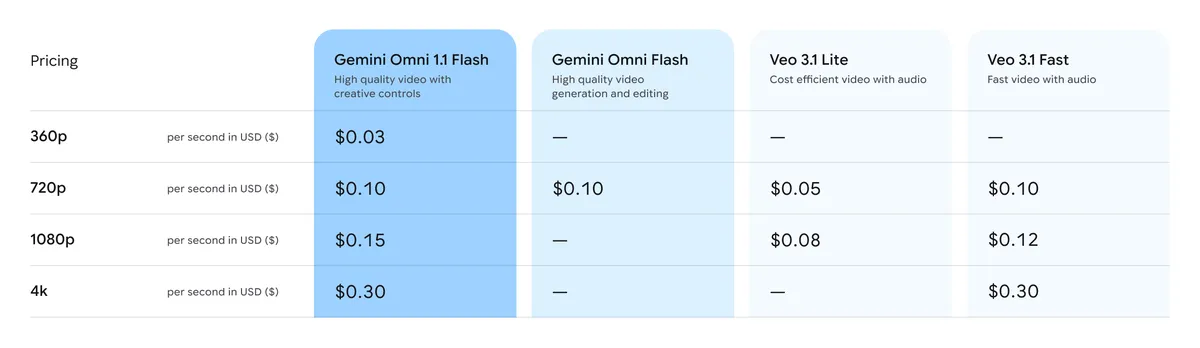
A table with pricing numbers for the Gemini Omni 1.1 Flash model.

Pricing table for Gemini Omni 1.1 Flash.

Omni 1.1 is rolling out across the Google developer ecosystem:

  • Start building in Google AI Studio: Try out Omni 1.1 directly in Google AI Studio.
  • Build on Gemini Enterprise Agent Platform: Enterprises can build with Omni 1.1 directly via Agent Platform API.
  • Explore the developer documentation: Check out the official documentation, the cookbook and prompting guides to learn how to integrate scene extensions, video references, and upscaling into your applications.

Omni 1.1 is also available to all Google AI Plus, Pro and Ultra subscribers globally in Google Flow, starting today. Scene extension is available to all Google AI Plus, Pro and Ultra subscribers globally in the Gemini app.

Gemini Omni 1.1 Flash Review: Accuracy, Price & Is It Worth It? (2026)

Gemini Omni 1.1 Flash is a major update to Google’s production-ready generative video model designed to give developers and creators unprecedented cinematic control over their video workflows. Released via the Gemini API in Google AI Studio, this model shifts AI video generation from unpredictable generations to a highly precise, directed process. [1, 2, 3]

  • 10-Second Contextual Scene Extension: The model can look back at up to 10 seconds of prior context (up from just 1 second in earlier versions) to continue generating footage. This allows creators to build cohesive stories in 10-second increments up to a 40-second cumulative cap while maintaining perfect lighting, environment, and character consistency. [1, 4, 5]
  • First-and-Last Keyframing: By specifying the exact opening and closing frames of a shot, you can direct the model to interpolate the continuous motion in between. This makes it easy to construct smooth camera loops, 360° orbits, and complex zoom transitions. [4, 6]
  • 360p “Pre-Vis” Draft Mode: Developers can generate fast, lightweight video previews at 60% faster speeds and a third of the compute cost of standard 720p footage. This allows rapid storyboarding and testing before committing resources to final renders. [4, 6]
  • 4K Production Upscaling: Once a low-resolution draft is locked in and approved, the workflow supports upscaling the output directly to polished 1080p or 4K resolutions ready for professional distribution. [4, 6]
  • Multimodal Video Referencing: You can feed up to 3 seconds of an existing video clip as an input reference to guide the style, motion dynamics, or choreography of the newly generated clip. [4, 6]

Read more

. Tap to pay with Google Pay is coming to Walmart

. Gmail Search’s AI Overviews now available globally

. Connect to more tools with Gemini in Google Workspace

. iPadOS 27 – Try This First

. Here’s how to use sign-to-text translation on Pixel 11.

. Connect to Google Meet hardware with room codes now generally available

. Enter Google Play’s sweepstakes to win legendary experiences and collectibles with your Play Points.

. Celebrate 110 years of national parks with Maps, Search, and Gemini

. Google partnering with the State of Delaware to provide free AI and career training.

. How developers build AI for good with Gemma 4

. Data regions support for Google Apps Script now generally available

. Reach your audience in new ways with August’s Demand Gen Drop.

for more refer Gemini website click here

for more refer Artificial Intelligence  website click here

Category: Artificial Intelligence Tags: AI Gemini, Facebook en Google, Gemini, Gemini AI, Gemini AI app, Gemini Live, Gemini Omni 1.1 API, Gemini Omni 1.1 Flash, Gemini Omni 1.1 Flash API, Gemini Omni 1.1 Flash free, Gemini omni 1.1 Flash pricing, Gemini omni 1.1 flash release date, Gemini omni flash api, Gemini Omni Flash preview, Gemini Omni Flash pricing, Google, Google com sign in, Google Facebook number, Google Flow AI video, Google Gemini, Google Gemini AI photo, Google India careers, Google India Gemini, Google India office, Google News facebook, Google search image, Google trending facebook, Hey Google, whatsapp, YouTube under Google
Post navigation
← Reach your audience in new ways with August’s Demand Gen Drop. The History of Computer – Calculator से AI →

Categories


Tax Heal Youtube Channel

https://youtu.be/jlzygPLPNno
September 2026
M T W T F S S
 123456
78910111213
14151617181920
21222324252627
282930  
« Aug    

Bank

Dont Forget to Subscribe for Latest Updates and News

Enter your email address:

Delivered by FeedBurner

Recent Posts

  • Kabhi Na Doobne Wala Titanic Aakhir Kaise Dooba? | Complete Story
  • The History of Computer – Calculator से AI
  • Gemini Omni 1.1 Flash lets you build with more control
  • Reach your audience in new ways with August’s Demand Gen Drop.
  • Data regions support for Google Apps Script now generally available
  • Inter State Council (Amendment) Order, 2026
  • Reappointing Shri Kamlesh Chandra Varshney, IRS IT 1990 Retd, to the post of Whole Time Member, Securities and Exchange Board of India.
  • Incorporate alternate means of identification for aadhar authentication
  • GST CASE LAW 22.09.2026
  • Section 129 Penalty Order Issued After 445 Days Void Ab Initio For Statutory Limitation Delay

TaxHeal

About Taxheal – Daily Tax ,GST & Law Updates Contact Us
  • Useful Links & GST
  • Disclaimer
  • New Releases in Book Store
  • TAXHEAL Mobile App Privacy Policy
  • National Company Law Tribunal
    Bank Concurrent Audit Procedure Manual

    Archives

    • September 2026
    • August 2026
    • July 2026
    • June 2026
    • May 2026
    • April 2026
    • March 2026
    • February 2026
    • January 2026
    • December 2025
    • November 2025
    • October 2025
    • September 2025
    • August 2025
    • July 2025
    • June 2025
    • May 2025
    • April 2025
    • March 2025
    • February 2025
    • January 2025
    • December 2024
    • November 2024
    • October 2024
    • September 2024
    • August 2024
    • July 2024
    • June 2024
    • May 2024
    • April 2024
    • March 2024
    • February 2024
    • January 2024
    • December 2023
    • November 2023
    • October 2023
    • September 2023
    • August 2023
    • July 2023
    • June 2023
    • May 2023
    • April 2023
    • March 2023
    • February 2023
    • January 2023
    • December 2022
    • November 2022
    • October 2022
    • September 2022
    • August 2022
    • July 2022
    • June 2022
    • May 2022
    • April 2022
    • March 2022
    • February 2022
    • January 2022
    • December 2021
    • November 2021
    • October 2021
    • September 2021
    • August 2021
    • July 2021
    • June 2021
    • May 2021
    • April 2021
    • March 2021
    • February 2021
    • January 2021
    • December 2020
    • November 2020
    • October 2020
    • September 2020
    • August 2020
    • July 2020
    • June 2020
    • May 2020
    • April 2020
    • March 2020
    • February 2020
    • January 2020
    • December 2019
    • November 2019
    • October 2019
    • September 2019
    • August 2019
    • July 2019
    • June 2019
    • May 2019
    • April 2019
    • March 2019
    • February 2019
    • January 2019
    • December 2018
    • November 2018
    • October 2018
    • September 2018
    • August 2018
    • July 2018
    • June 2018
    • May 2018
    • April 2018
    • March 2018
    • February 2018
    • January 2018
    • December 2017
    • November 2017
    • October 2017
    • September 2017
    • August 2017
    • July 2017
    • June 2017
    • May 2017
    • April 2017
    • March 2017
    • February 2017
    • January 2017
    • December 2016
    • November 2016
    • October 2016
    • September 2016
    • August 2016
    • July 2016
    • June 2016
    • May 2016
    • April 2016
    • March 2016
    • February 2016
    • January 2016
    • December 2015
    • November 2015
    • October 2015
    • September 2015
    • August 2015
    • July 2015
    • June 2015
    • April 2015
    • September 2014
    • April 2014
    • June 2013
    • April 2013
    • March 2012
    • August 2011
    • June 2011
    • April 2011
    • January 2011
    • April 2009
    • January 2009
    • February 2005
    • July 2001
    • June 2000
    • January 1998
    • April 1994
    • August 1989
    • June 1989
    • October 1988
    Tax Heal © 2014 - 2026. All rights reserved.
    CA Satbir Singh M-09872233989 Email-Taxheal@gmail.com
    Iconic One Theme | Powered by Wordpress