


Do better research with NotebookLM

Do better research with NotebookLM
Three years ago we launched NotebookLM as an experimental AI product from Google Labs to help you understand anything. Millions of people and organizations turn to NotebookLM as a collaborative knowledge and research partner because it helps them organize their thinking, identify deeper connections across their documents and spark new ideas. Today google introducing across the board upgrades to NotebookLM that deliver new agentic capabilities in chat and more advanced reasoning to tackle the most complex research projects.
An upgraded, more thoughtful chat experience
First, google upgrading NotebookLM to run on Gemini 3.5 and Antigravity providing even more accurate and reliable information along with better visibility into the thinking process.
Each notebook is now equipped with a secure cloud computer, enabling NotebookLM to write and run code useful for helping you perform deeper research and more complex analysis. The system includes more than 100 curated software skills, unlocking a wide range of new capabilities to help you more deeply understand the sources in your notebook.
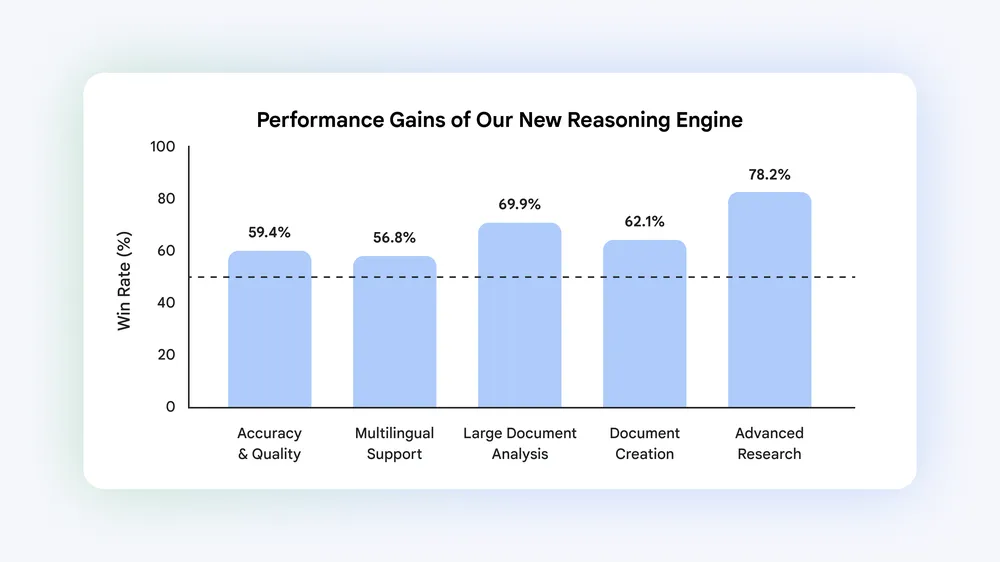
In our side-by-side evaluations against our prior system, the upgraded NotebookLM achieved an average win rate of over 65% (a 15% point margin above parity) across our top five core evaluation dimensions. The system demonstrated substantial improvements in large document analysis, securing a 69.9% win rate and achieved exceptional performance in advanced web research and source discovery reaching a 78.2% win rate against our prior baseline. 1
More output formats, with improved customization
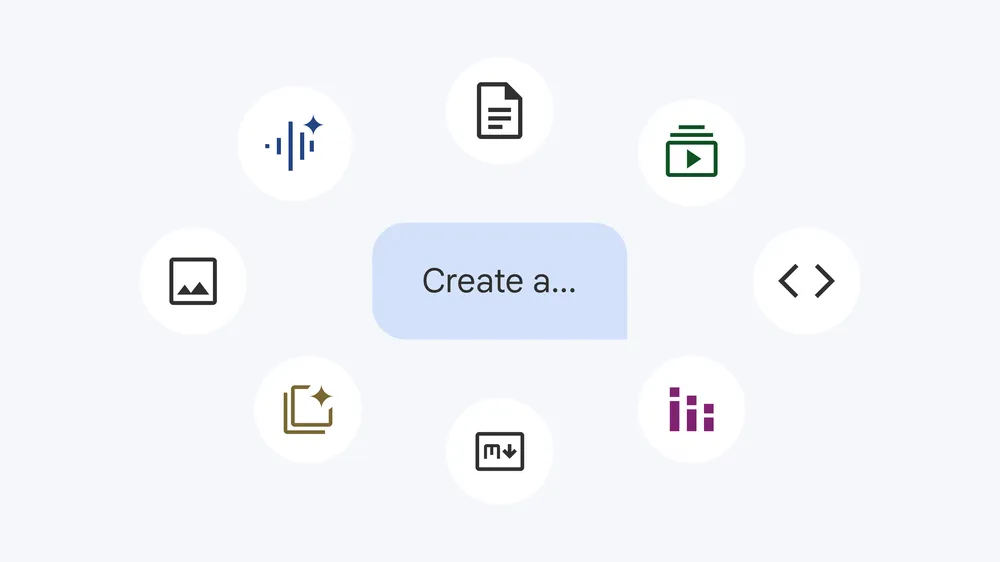
You can now ask NotebookLM to create outputs in even more formats and provide detailed instructions to guide the outputs. NotebookLM will assemble the context from your sources to produce useful and high quality formats like PDF reports with charts and tables, detailed budget spreadsheets, and bespoke student worksheets — all ready to download directly from the studio panel. You can even make edits after your outputs are generated. New output formats include:
- Data visualizations and charts (png, svg)
- Documents (PDFs, docx, markdown, text files)
- Images with Nano Banana (png, jpg, gif)
- Structured data (csv, json)
- Microsoft Excel (xlsx)
- Microsoft PowerPoint (pptx)
We plan to add additional formats in the future to help make NotebookLM more helpful in more ways.
More effortless research
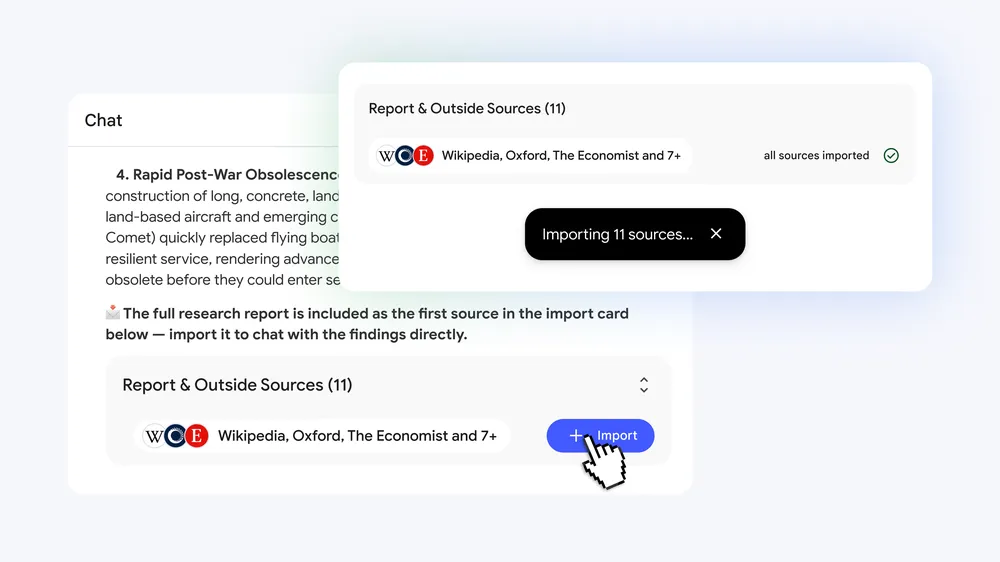
Finally, google making it easier to get your research started. Previously, NotebookLM was most helpful when you came with your own sources and a good handle on your project. You can now start with loose ideas and questions. NotebookLM can guide you through building your source repository directly in your chat, making it even easier to get started on any project. Perhaps you want to find primary sources in other languages to better understand new perspectives, or you’re seeking related works by an author you recently discovered. It can even use Google Search to find relevant, high quality sources from the web and add them to your notebook.
You’re still in control of the sources that you add to your notebook so that your work stays grounded in the information you trust and all sources continue to be clearly attributed.
More helpful in more situations
Here are some workflows these improvements enable:
- Researchers: A data analyst can combine data from various countries with conflicting formatting. To make this information useful, the analyst can ask NotebookLM to conduct web research to find additional context, write code to perform accurate data analysis, and create charts and a PDF report to showcase the results.
- Technical Professionals: A program manager can decipher complex specifications for customer integration, instantly transforming the technical documentation into a polished, simplified guide, slide deck and a step-by-step roadmap for the team.
- Small Business Owners: A gym owner can run a media campaign and analyze raw sales data against ad spend. By calculating the campaign’s financial impact using NotebookLM, the business owner is better equipped to decide whether to expand to other cities.
These updates are rolling out globally on the web starting today to all users with Google AI Ultra and all Workspace business customers with AI Ultra Access and AI Expanded Access, and we plan to expand to others over time. We look forward to your feedback.
- Deep Research & Goal-Based Chat: NotebookLM allows you to dive into complex topics by pulling patterns and citations directly from your notes. You can define specific goals for the chat—such as finding gaps in current research or generating summaries tailored to a specific reader persona. [1]
- Multimodal Source Support: You can drag and drop a wide variety of sources into your notebook, including Google Docs, Google Sheets, Drive PDFs, .docx files, images, and Drive URLs. [1]
- Audio Overviews: Instantly transform your documents into narrated audio summaries. You can even choose specialized formats like briefs, critiques, or debates to hear diverse perspectives on your research material. [1, 2]
- Automated Study & Asset Tools: Generate highly structured content like flashcards, mind maps, and personalized learning guides to master any subject quickly. [1]
- Web Research Integration: If you are starting with loose ideas rather than finalized documents, NotebookLM can utilize Google Search to find relevant, high-quality sources and add them to your notebook. [1]
- Source Control: Upload your research papers, messy international datasets, or dense technical specifications directly into the workspace. [1, 2, 3]
- Contextual Prompting: Instead of asking for a generic “summarize,” ask highly specific questions, such as “What concepts are identified as open research problems?” or “Summarize the novel contributions of this paper for a researcher familiar with existing models?”. [1]
- Traceability: Always verify insights using the direct inline citations that guide you right back to the exact passage in your source document. [1]
Read more
. Dive deeper into I/O 2026 with NotebookLM
. Use NotebookLM in your Google Workspace Studio flows
. NotebookLM introducing Slide Decks
How to Use NotebookLM to Create YouTube Scripts
How to Use NotebookLM for Income Tax Planning
How to Create Smart Notes from Books and Articles Using NotebookLM
Using NotebookLM to Understand Complex Documents Easily
Convert Notes into Easy Summaries with NotebookLM
How to Summarize Long PDFs Using NotebookLM
for more refer Gemini website click here
for more refer Artificial Intelligence website click here