


New calendar sharing permission level and changes to recurring event visibility

New calendar sharing permission level and changes to recurring event visibility
Google introducing a new calendar sharing permission level: “Make changes (see private events as free/busy)”. This allows you to grant someone edit access to your calendar while keeping the details of your private events entirely hidden. This is especially useful for leaders who assign delegates to help them manage their calendars.
Delegates assigned this restricted permission level will only be able to create, delete, and edit non-private events. Private events will appear to delegates as “busy” blocks on the calendar grid, and delegates will not be able to edit or reschedule them. In addition, private events won’t show up in any search results for delegates.
Changes to visibility for recurring events
Google also introducing changes to the way visibility settings are applied to recurring events.
- Users can no longer make changes to the visibility of a single event in a recurring series. Any changes to visibility will be applied to all events in the series.
- Existing events in a recurring series will be updated to match the strictest visibility setting of any event in that series. In other words, if one event in the series is marked private but the others are not, all events in that series will be changed to private.
Getting started
- Admins: There is no admin control for this feature.
- End users: Users can grant delegates this new permission level in their Calendar settings. Visit the Help Center to learn more about sharing your calendar.
Rollout pace
- Rapid and Scheduled Release domains: Extended rollout (potentially longer than 15 days for feature visibility) starting on July 7, 2026
Availability
- Available to all Google Workspace customers, Workspace Individual subscribers, and users with personal Google accounts
Resources
- Google Calendar Help: Share your calendar
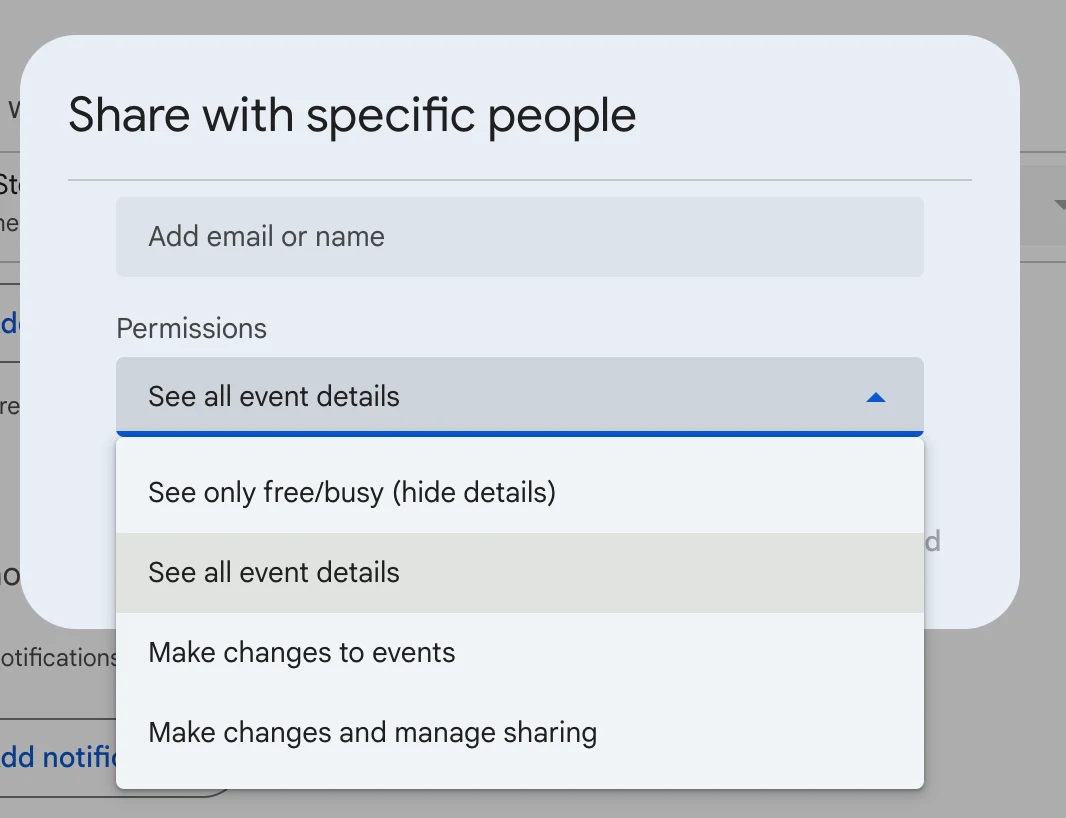
New Delegate Permission Level
- Restricted Edit Access: You can grant delegates (such as administrative assistants) edit access to your calendar while completely obscuring your private personal details. [1, 2]
- “Busy” Placeholders: Any event marked as “Private” appears to the delegate only as a blank “Busy” block on the calendar grid. [1, 2]
- No Modifying Private Events: Delegates using this permission level cannot view details, edit, delete, or reschedule your private events. [1, 2]
- Search Exclusion: Private events are completely hidden and will not show up in any keyword search results performed by the delegate. [1, 2]
Changes to Recurring Event Visibility
- No Single-Event Exceptions: Users can no longer modify the visibility setting of just one individual instance within a recurring series. Changing the privacy level will instantly cascade to all events in that series. [1, 2]
- Strictest Setting Enforcement: Existing and new recurring series are automatically updated to match the most restrictive visibility setting present. For example, if even a single instance of a weekly meeting is marked “Private,” the entire series changes to private. This prevents accidental data exposure due to human error. [1, 2]
How to Get Started
- Admin Action: No action is required from IT administrators; there are no admin console toggles for this rollout.
- End Users: You can assign this new access tier by navigating to Google Calendar Settings > Settings for my calendars > Share with specific people, and selecting the new permission from the dropdown menu. [1, 2, 3, 4]
Read more
. Big news for Jodhpur! A world-class airport terminal is here
. MCP vs API: Why traditional APIs are failing AI agents
. A new way to connect and earn with gifts
. What’s at the center of Claude’s mind?
. Join video conferences on Google Meet hardware via SIP through Pexip
. Occupancy counting now available for Google Meet on Neat room hardware
. Fill with Gemini in Sheets now available in 11 additional languages
.
for more refer Gemini website click here
for more refer Artificial Intelligence website click here