


Stricter classifications for Google Groups to enhance data security and privacy
Stricter classifications for Google Groups to enhance data security and privacy
Earlier this year, we announced changes to Google Groups to enhance data security and privacy. The changes, which are rolling out now, include:
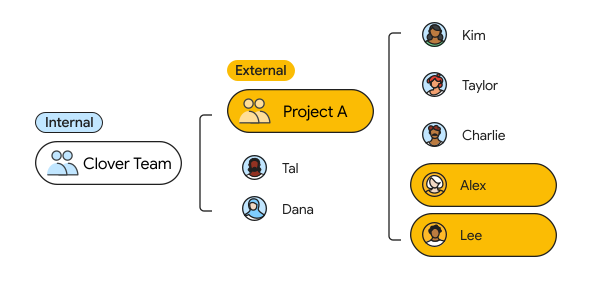
- Stricter “internal” and “external” classifications for Groups
- Clearer visual indicators for whether a group contains external members
- Changes to how emails are shown within Google Groups
- Additional settings granularity to control who can add external users (admins only, or admins and end users)
- Changes to how admins can add external users via Groups APIs
Getting started
- Admins: To ensure a smooth transition, existing groups will be automatically classified based on their current membership, so there will not be any changes in access. You can review and adjust these labels directly in the Admin console or via the Groups Settings API to match your organization’s security needs.
- End users: There is no action required for end users.
Rollout pace
- Rapid Release and Scheduled Release domains: Rolling out now, with expected completion by July 1, 2026
Availability
- Available to all Google Workspace customers
Resources
- Google Workspace Admin Help: Changes to internal and external classifications in Google Groups
Core Changes in Group Classifications
- Strict “Internal” Enforcement: If “Allow members outside your organization” is disabled, the group cannot contain external members under any circumstance. [2]
- Legacy Loophole Closure: Previously, external members could remain in an “internal” group if added by an administrator, nested within an external group, or if the group’s status was flipped from external to internal. This behavior is no longer supported. [2]
- Automatic Reclassification: To prevent workflow disruption, existing internal groups that already contained external members have been automatically reclassified as “external,” with settings adjusted so that only admins can add further external users. [2]
New Security and Privacy Features
- Visual Indicators: Clearer visual tags now show within Google Groups to alert users if a group includes external members. [1]
- Email Visibility Adjustments: Changes have been made to how emails are displayed within the Google Groups interface to better protect user identities. [1]
- Granular Admin Controls: Administrators can decide whether only admins can add external users, or if end-users retain that privilege. [1]
- API Constraints: When an admin syncs data via the Cloud Identity or Admin SDK Directory API, attempting to add an external member to an internal group will automatically update the group’s settings to allow it, preventing API sync failures. [1]
Action Plan for Administrators
- Review Group Labels: Check your active groups inside the Google Admin Console or via the Groups Settings API to adjust newly auto-classified groups. [1]
- Apply Security Labels: Permanently convert high-risk groups into Security Groups within the Admin Console to enforce mandatory access controls. [3, 4]
- Audit via DLP: Combine your group classifications with Data Loss Prevention (DLP) policies to block sensitive outbound emails or automatically attach data sensitivity headers/footers. [5, 6]
Read more
. This Is The First Real Shape Of AGI: Fusion Agents
. Your biggest ideas now bigger | June ’26 Pixel Drop
. Enhanced security monitoring with expanded Admin password reset alerts
. Join Google Meet calls from Safari on iOS devices
. Google Apps Script is now a Google Workspace core service with enterprise-grade data protection
. Connect to Google Meet hardware with room codes now in Early Preview
. Cannes Lions 2026: Strengthen creative campaigns with new tools from YouTube
. Tag Claude in, right where you already work
. World Surf League x Apple: How Apple Watch Changed Pro Surfing
. Updates to Gemini in Google Classroom
for more refer Gemini website click here
for more refer Artificial Intelligence website click here