


September Android Drop: Remember where you put things, ease motion sickness, and more
September Android Drop: Remember where you put things, ease motion sickness, and more
5 new Android features make life a little easier — and a little more stylish.
Click Here Open
The latest updates in the September Android Drop help you stay connected effortlessly. From keeping track of important items in Find Hub to reducing motion sickness during your ride, your device is designed to adapt to your life.
1. Keep track of important items.
Soon, you’ll be able to ask Gemini to remember where you placed important items, and it will save their locations in Find Hub so you can easily find them later. For things you don’t put a tracker tag on, like your passport or a spare key, say something like, “Hey Google, remember in Find Hub that I put my passport in my bedroom drawer,” and add an optional photo. When you need to find it, just ask Gemini for its location or check your remembered items tab in Find Hub. Try it on Android 16+ devices in countries where Gemini and Find Hub are supported.
Get Gemini to remember where you stored your passport, spare keys, and more.
2. Help reduce motion sickness during your ride.
Keep using your phone from the passenger seat while reducing motion sickness with Motion Assist, which adds a subtle bubble overlay to your screen that moves with the vehicle. It’s designed to help bridge the gap between what your eyes see and the movement of your ride. Set it to turn on automatically, add it to Quick Settings, and customize the bubble’s shape, color, and opacity to match your style. Try it during your next ride on phones using Android 17.
Read, browse, or watch videos while reducing motion sickness.
3. Use Guided vision to understand things around you.
Share your camera in Gemini Live to hear descriptions of what’s in front of you. Designed for and with the blind and low-vision communities, Guided vision 1 can help with things like reading fine print on a food label, ordering from a menu in a low-lit restaurant, or identifying household objects. If your camera isn’t lined up, voice feedback will guide you to reframe it, pan across a space, or center an object so you get the answers you need. For quick access, add Guided vision to your Accessibility shortcuts or enable it directly from the TalkBack menu or Gemini App Settings. Guided vision is coming soon to phones running Android 9+ in countries where Gemini is available.
Get real-time help from Gemini as it talks you through your surroundings.
4. Use Google Keep to create and edit notes with friends right from your chat.
Share and update grocery lists or vacation notes right inside your chat so everyone is on the same page. The whole crew can view, edit, and add ideas, making it effortless to collaborate on the fly without switching apps. Just hit the + icon in Google Messages to bring Google Keep into your conversations. Rollout starts today in Google Messages.
Create a new list or note without leaving Google Messages.
5. Personalize your chats to match your style with custom backgrounds and themes.
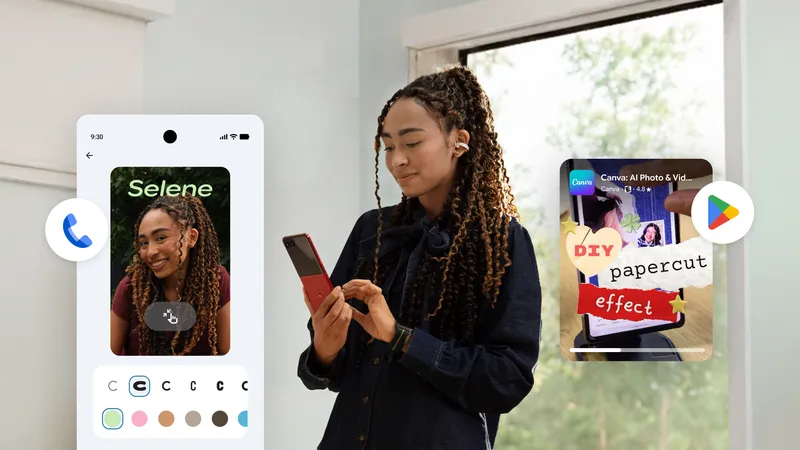
With Chat theme in Google Messages, you can customize each chat with a distinct background and colors. Pick a wallpaper or use your own photo, and your text bubbles will automatically match — or change the colors to suit your personality. Set a latte theme for your coffee buddy or use a beach photo for the vacation group chat to style your screen your way. Chat theme is available to use now in your Google Messages.
Give each chat its own unique look.
Learn about these new features and more at android.com/drop, or see them in action in our demo video.
- How it works: Say a command like, “Hey Google, remember in Find Hub that I put my passport in my bedroom drawer,” and optionally attach a photo. [3]
- How to retrieve: You can check the new “Remembered items” tab directly inside the Find Hub app or ask Gemini for its location via voice command. [3, 5]
- Availability: Requires devices running Android 16 or newer. [3, 4]
- How it works: It adds a subtle, customizable animated bubble overlay on your screen edges that dynamically syncs and moves with the vehicle’s motion. [3, 7]
- Customization: You can alter the bubbles’ shape, color, and opacity, toggle them to turn on automatically, or add a shortcut to your Quick Settings. [3, 6]
- Availability: Requires Android 17. [4, 6]
- How it works: Users can share their live camera feed during a Gemini Live session to receive real-time audio guidance.
- Voice Feedback: Gemini will provide spoken instructions to reframe, re-center, or pan the camera to accurately identify household objects or read dimly lit menus.
- Availability: Broadly supported on Android 9 and newer. [4]
- How it works: Users can pin shared Google Keep notes to a chat. This allows group participants to view, edit, and add items concurrently—ideal for coordinating live grocery lists or party planning. [1, 9, 10, 11]
- How it works: You can completely customize individual chat threads by changing the color of text bubbles and assigning specific photos or designs as unique chat backgrounds. [9]
Read more
. Gemini Omni 1.1 Flash lets you build with more control
. View conference room and meeting location details directly on the Google Meet homepage
. Introducing Expert Intelligence in Gemini Notebook
. Google Flow brings new creative control features to enhance video editing.
. Gemini introducing flexible usage limits for Gemini Notebook.
. Expert Intelligence: a new way for you to engage with trusted content
. Introducing agentic video understanding with Gemini
. Get Stuff Done with ChatGPT Voice
for more refer Gemini website click here
for more refer Artificial Intelligence website click here