


New ways to find your favorite sources and original content in AI Search

New ways to find your favorite sources and original content in AI Search
When you come to Search, you’re looking for information you can trust from the sources, websites and creators you value most — and we’re continuing to launch updates to make it easier to explore the web. Now we’re bringing your Preferred Sources directly into our AI experiences, and launching new features to help you discover original content, creator insights, and unique perspectives.
Preferred Sources, now in AI Search
Our Preferred Sources feature makes it easy to see more from your favorite websites. And starting today, it’s coming to AI Overviews and AI Mode, so you’ll be able to easily spot links in AI responses from the sources you’ve already selected. Just like in Top Stories, your Preferred Sources will be clearly labeled to stand out.
Setting it up is simple: just visit source preferences in Search personalization settings to find and add your favorite sources. Any website that publishes fresh content is eligible. We’ve found that people are twice as likely to click through to a Preferred Source, and people have already selected more than 345,000 unique sources.

Article links in an AI response about the best zoos have “Preferred” labels so you can easily spot content from your Preferred Sources.
It’s been great to see so many publishers and website owners encouraging their readers to use Preferred Sources. Site owners can find tips on how to do that on our documentation page.
Fresh perspectives, new updates and prominent links
We’re introducing a new way to explore articles and perspectives when you’re looking to understand the latest updates on a topic you’re interested in. We know people often want to read an article or a post for these searches, but some initial context and a range of options helps them decide where to dig in. Now, for some searches when you have a question about a developing topic, you’ll start seeing a prominent carousel, which will also highlight your Preferred Sources. This will help make timely articles more visible on a wider range of queries.

For a question about Super El Niños, a AI response shows a bit of context followed by a prominent link carousel.
And for some searches where you might be looking for insights from others, you’ll soon see a similar carousel with helpful perspectives from online discussions, forums, and social media.
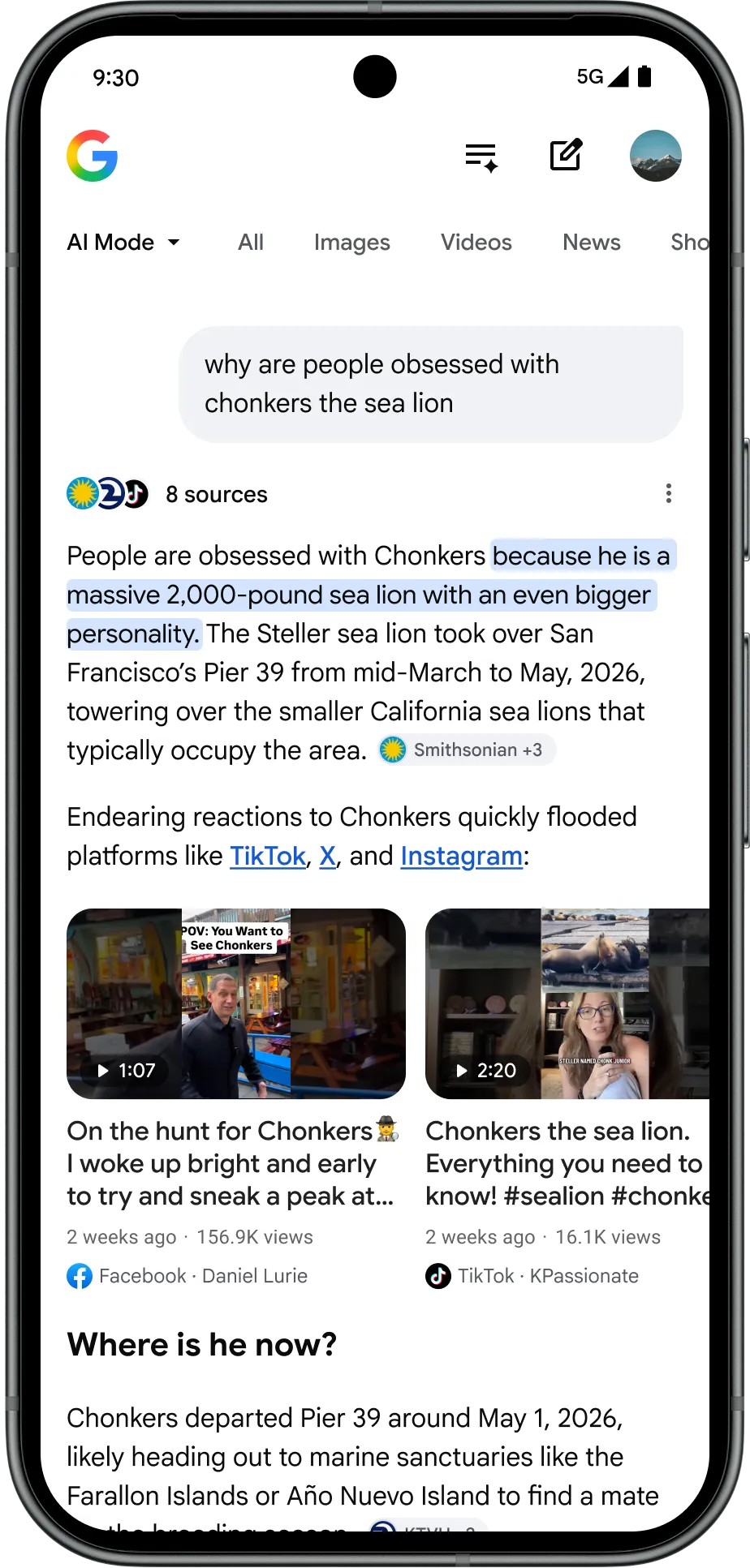
An AI response about Chonkers the sea lion features a short overview followed by a carousel of links to firsthand perspectives on the topic.
“Highly Cited” labels to highlight influential coverage
We’re also adding a “Highly Cited” badge to more web article links on the search results page. This label makes it easy to spot articles that many other stories have cited, helping you find the primary reporting that other articles are referencing. We’re also indicating when an article explicitly references a Highly Cited source. These are simple ways to help you discover influential coverage of topics you’re interested in.
1. Direct Control Over Personal Sources
- Preferred Sources (Google AI Search): You can now add your favorite websites and publishers directly into your Search personalization settings. Once labeled, Google highlights these trusted sites inside AI Overviews and AI Mode, making them twice as likely to receive your click-throughs.
- Perplexity “Focus” Feature: Instead of scanning the entire web, you can lock your search to specific buckets—such as Academic papers, YouTube, Reddit, or Writing—ensuring you only pull original material from platforms you care about.
- Persistent Research Spaces: Platforms like Perplexity AI let you build dedicated “Spaces” where you can pin specific source guidelines or restrict the AI to pull from designated competitor or industry sites. [6, 7, 8, 9, 10, 11]
2. Spotting Original Reporting at a Glance
- “Highly Cited” Badges: Google now appends a specific badge to original reporting, investigative journalism, and primary sources within search carousels, allowing you to instantly separate the original author from secondary aggregators.
- Discussion & Perspective Carousels: AI search tools are increasingly capturing human experience by pulling first-person insights from public discussions, message boards, and social media platforms into dedicated content carousels.
- Inline Verifiable Citations: True AI answer engines (like Perplexity) construct answers step-by-step and tie every claim directly to a numbered, interactive footnote. You can verify the data without reading a massive article. [7, 8, 12, 13, 14]
3. Integrated Subscriptions & Paywalls
- Subscription Linking API: Google has expanded its integration with publisher paywalls. If you link your news subscriptions to your Google account, the AI engine can securely read, synthesize, and prominently feature paid content that you trust right inside your AI Overviews. [15, 16]
4. Side-by-Side Web Navigation
- AI Mode in Chrome: Instead of constantly switching browser tabs, tools like AI Mode in Chrome open web pages side-by-side with your search query. You can read a creator’s original content while using the AI pane to ask highly specific, contextual follow-up questions in real time. [17]
Direct Feature Comparison
[Brave Search](https://www.inqnest.com/blog/brave-ai-search-engine-reshaping-search-industry)
| Feature [6, 7, 11, 14, 15, 16, 18, 19] | Google AI Search | Perplexity AI |
|---|---|---|
| Source Prioritization | Yes (“Preferred Sources” settings) | Yes (“Spaces” & domain limits) |
| Original Content Badging | “Highly Cited” Badges | Highly visible numerical footnotes |
| Paid Subscription Support | Yes (Subscription Linking API) | Limited |
| Discussion & Forum Focus | Dedicated Perspectives Carousels | Focus filter (Reddit/Discussions) |
Tips for Content Creators and Businesses
Read more
. Top 3 AI on Android updates for building intelligent experiences (Google I/O 2026)
. Google Antigravity | I/O 2026 Keynote
. School of Football Training 1. The Basics
. School of Football Can football teach robot to move?
. How Turing unlocks human capability with Google Workspace with Gemini
. Dive deeper into I/O 2026 with NotebookLM
. Puppets x AI Behind the Scenes with Timmy TPU
for more refer Gemini website click here
for more refer Artificial Intelligence website click here