


New and improved: Computer-using agents, a new workflows experience, and real-time voice experiences

New and improved: Computer-using agents, a new workflows experience, and real-time voice experiences
Expectations for agents are changing quickly. Teams want to move beyond conversational experiences to systems that can help get work done by interacting with applications, executing workflows, collaborating across tools, and supporting customers more naturally across channels.
But getting there can be tough. Many organizations are still balancing modern, real-time AI experiences with older systems and processes that were never designed to work together. That can leave teams stuck maintaining brittle automations, disconnected processes, and rigid customer interactions that are difficult to evolve. New updates in Microsoft Copilot Studio focus on helping organizations achieve more connected, adaptive automation systems—structured where needed and adaptive where valuable.
Computer use and workflows: Adapt automation to your team’s real work
Traditional automation works best in predictable environments. But many real business processes are anything but predictable. Interfaces change. Vendor portals update unexpectedly. Legacy systems lack APIs entirely. As a result, even relatively simple processes can require constant maintenance just to keep automations running reliably.
That’s the kind of gap computer-using agents are designed to help close.
Computer-using agents are now generally available
With computer-using agents now generally available in Copilot Studio, organizations can build agents that interact directly with websites and desktop applications through the user interface (UI). This helps you automate processes that previously relied on brittle scripts or manual workarounds because the underlying systems lacked APIs.
With the new release also comes new enterprise-ready capabilities designed to help you operationalize UI automation more confidently. Organizations can now manage credentials more securely, choose models best suited for different automation scenarios, and build more resilient automations that can adapt to changing interfaces instead of breaking whenever a screen or webpage changes.
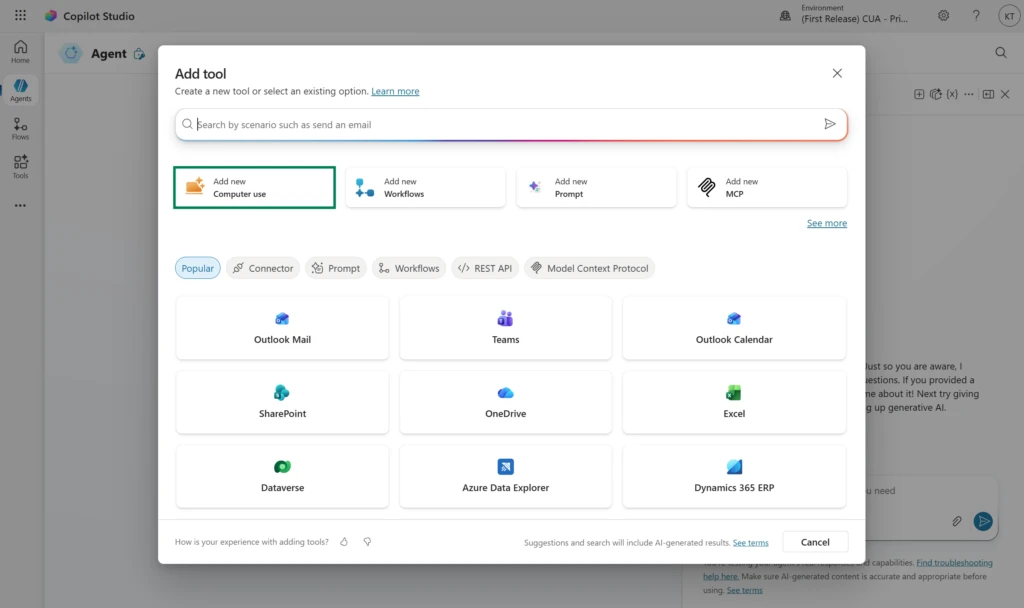
In addition, organizations can now embed computer-using agents directly into multi-step workflows. This feature, now moving into preview, further helps teams combine API-based actions, approvals, business logic, and adaptive UI interactions within the same automation system.
But adaptability automation still needs structure. As organizations scale beyond isolated automations, teams need a way to orchestrate all these in a way that’s easier to understand, maintain, and evolve over time.
That’s where the new workflows experience in Copilot Studio comes in.
A simpler, more intuitive way to build powerful workflows
Now available in early release environments, the redesigned workflows experience introduces a more intuitive visual designer for building and orchestrating agentic automation in one place. Instead of stitching together disconnected tools and logic across multiple surfaces, you can design workflows end-to-end on a unified canvas. This helps you more clearly see how actions, decisions, and AI-powered steps work together across a business process.
A core component of the new experience is the ability to add existing agents directly into workflows. These agent nodes allow you to create automated solutions that keep the scalable reliability of workflows while bringing in AI intelligence when you need it. For example, when a workflow hits a decision that can’t be captured in simple if-then logic—where it needs to use reasoning over context, orchestrate tools, or retrieve knowledge from multiple sources—an agent node can help bridge the gap and make your workflow more effective.
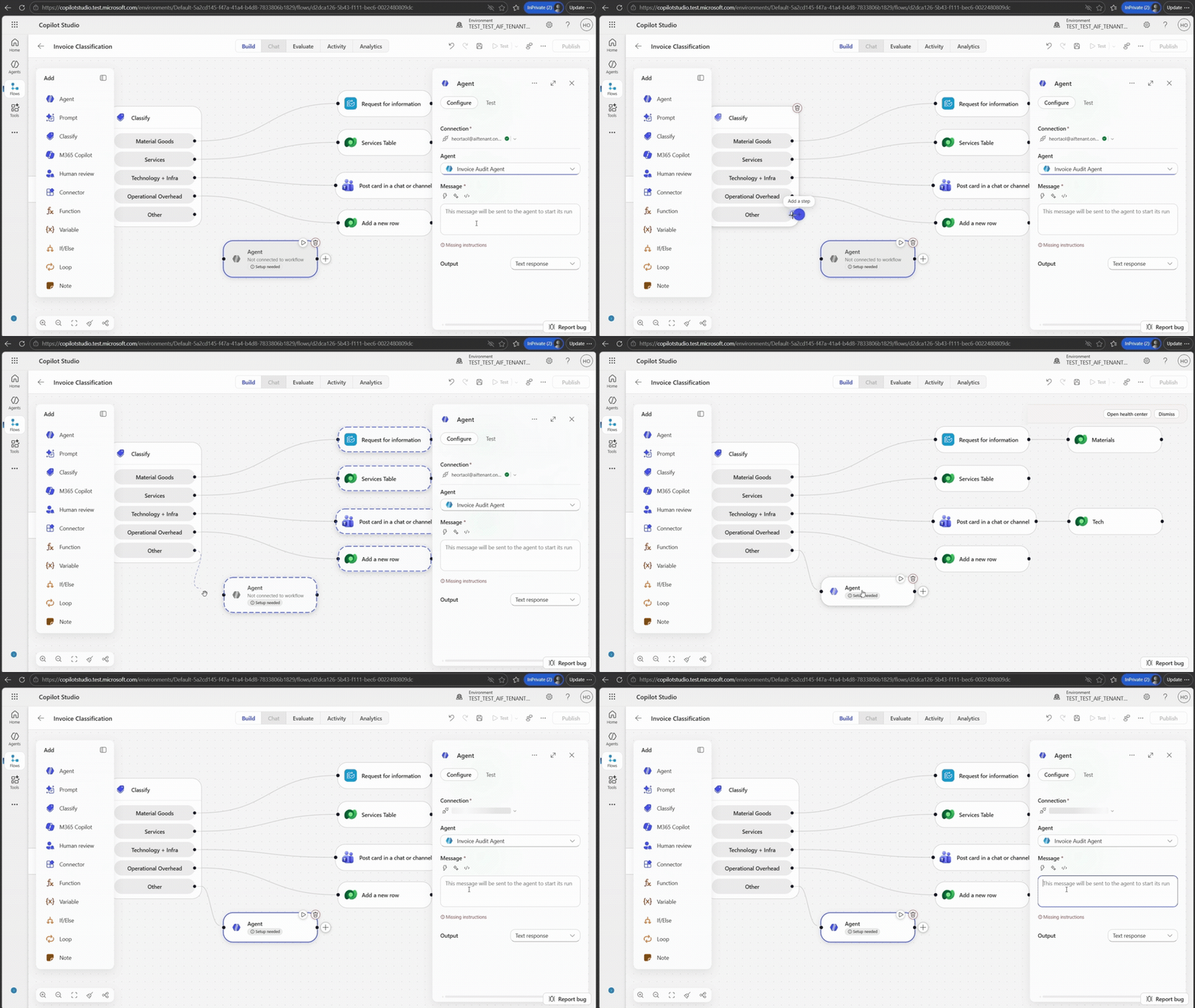
The new designer also helps reduce friction for teams building and maintaining these systems. Inline configuration, simplified building blocks, and node-level testing help validate workflow behavior earlier and iterate more quickly. In addition to agent nodes, AI-powered actions like classification, content generation, and decision support can now be incorporated directly into the workflow.
New and improved: Computer-using agents
Together, these updates help organizations combine deterministic orchestration with adaptive execution—structured where needed, adaptive where valuable.
How Graebel combines flows and computer-using agents
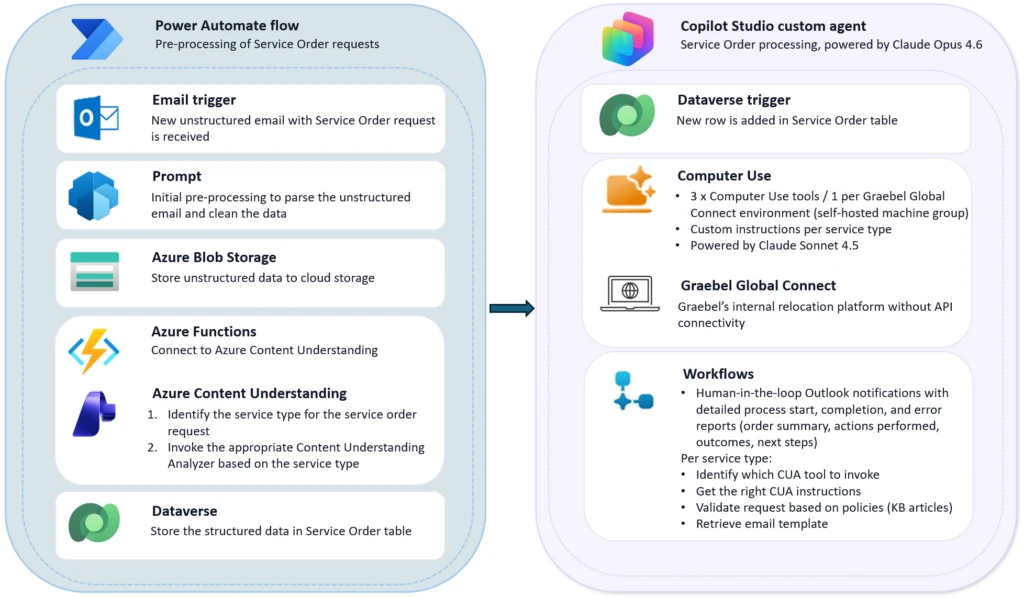
Graebel, a global leader in talent mobility, processes thousands of employee relocation requests each year. Most of these come in as unstructured emails filled with unique instructions, attachments, and edge cases. Because Graebel’s proprietary Global Connect platform lacked API support, earlier automation efforts proved too rigid to keep up with the variability of real-world requests. That meant lots of manual input and handoffs—which automation was supposed to solve. Basically, Graebel needed automation that could use reasoning, not just click.
Working with GET AI and Microsoft, Graebel built the Graebel Service Order Agent in Copilot Studio using computer use capabilities to help automate the process end to end. The agent can interpret incoming emails, validate requests against business rules, operate Global Connect directly through the UI, and escalate exceptions through workflows when needed.
New and improved: Computer-using agents
Read more
. Top 3 AI on Android updates for building intelligent experiences (Google I/O 2026)
. Google Antigravity | I/O 2026 Keynote
. School of Football Training 1. The Basics
. School of Football Can football teach robot to move?
. How Turing unlocks human capability with Google Workspace with Gemini
. Dive deeper into I/O 2026 with NotebookLM
. Puppets x AI Behind the Scenes with Timmy TPU
. New ways to find your favorite sources and original content in AI Search
. Improving AI labels for viewers and creators
for more refer Gemini website click here
for more refer Artificial Intelligence website click here