


Expanded options for header images in Google Forms
Expanded options for header images in Google Forms
Form creators now have more options for header images in Google Forms. Previously, creators could only use a pre-selected theme, upload an image, or choose an image from Google Photos. In addition to these options, they can now choose an image from Google Drive or Google Images or use a URL. This makes it easier to add an appropriate and compelling header image to your form.
Click Here Open
Getting started
- Admins: There is no admin control for this feature.
- End users: Visit the Help Center to learn more about adding a header image.
Rollout pace
- Rapid Release domains: Gradual rollout (up to 15 days for feature visibility) visibility) started on May 14, 2026
- Scheduled Release domains: Gradual rollout (up to 15 days for feature visibility) starting on June 1, 2026
Availability
- Available to all Google Workspace customers, Workspace Individual subscribers, and users with personal Google accounts
Resources
- Google Help: Change the theme or font of your form
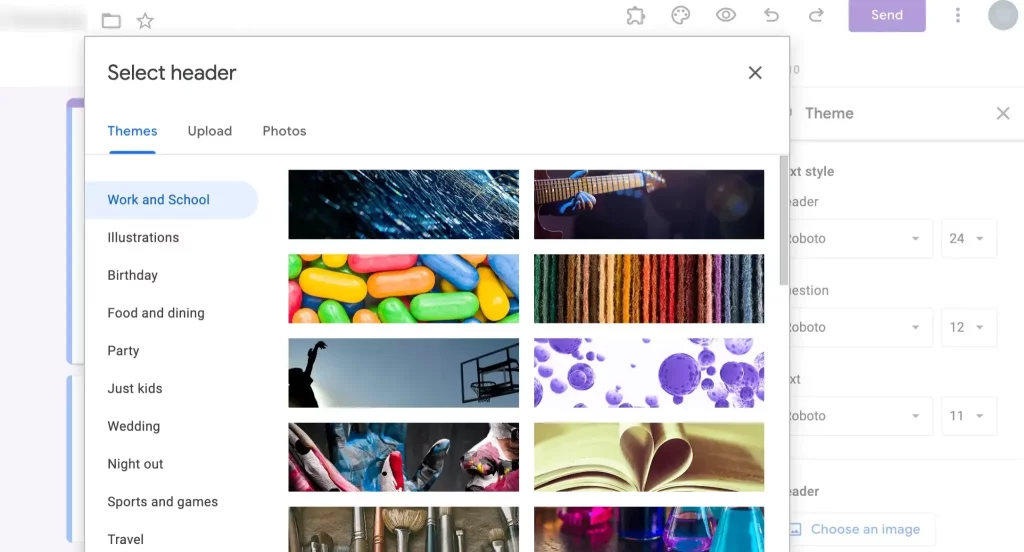
- Ideal Size: Use a \(1600 \times 400\) pixels (\(4:1\) aspect ratio) image to avoid distortion.
- How to Apply: Click the “Customize Theme” paint palette icon, select “Choose Image” under the header section, and select your source.
- Crop Tool: After selecting an image, a cropping tool will allow you to adjust the focus area to ensure the best fit. [1, 2, 3]
Read more
141. Add avatars when you convert presentations to Vids
142. Reclaim your time with Pause Point.
143. How were protecting you from scams and fraud
144. How Introducing Googlebook
145. The Android Show: I/O Edition | Googlebook
146. Introducing Gemini Intelligence
147. Android makes it easier to share, switch and connect securely
148. Use NotebookLM in your Google Workspace Studio flows
149. Generate video with Veo 3: Now available in Google Vids
150. What’s New in Android Security and Privacy in 2026
151. Helping founders build stronger AI products: Introducing Google for Startups Immersion
152. Catch the recap of The Android Show | I/O Edition!
for more refer Artificial Intelligence website click here